• Página inicial
  • Para clientes
  • Para fornecedores
  • Soluções
    • Xvantage
      Xvantage
      Descubra o próximo nível de transformação dos negócios.
      Nuvem
      Nuvem
      Sucesso de fácil rastreamento para seus negócios na nuvem.
      Ciclo de vida
      Ciclo de vida
      Permita um ciclo de vida de produto circular e sustentável.
      Soluções de cliente e endpoint
      Soluções de cliente e endpoint
      Esteja um passo à frente quanto às necessidades de seus clientes.
      Avançado e especialidade
      Avançado e especialidade
      Encontre soluções sob medida e descubra novas oportunidades de mercado.
  • Empresa
    • Quem somos
      Saiba mais sobre a empresa por trás das marcas do mundo.
      Carreiras
      Junte-se a um local de trabalho premiado para se preparar para o futuro por meio da tecnologia.
      Eventos
      Aumente sua rede, aprenda com líderes do setor e veja o que a tecnologia pode proporcionar.
      Sala de mídia
      Explore nossos ativos de marca, fotos de alta resolução, modelos padrão e muito mais
      Comunicados de imprensa
      Fique por dentro das últimas notícias e atualizações.
      Para investidores
Entrar Tornar-se parceiro
  • Português (Brasil) Selecione sua lingua
      • Deutsch
      • English (US)
      • Español (Latinoamérica)
      • Français (Canada)
      • Français (France)
      • Italiano
      • Nederlands
      • Português (Brasil)
      • ไทย
      • 中文(简体)
      • 中文(繁體)

The Feed

Explore expert insights, technology trends and practical resources covering AI, cloud, cybersecurity, digital transformation and business innovation.

Top insights this month
Catch the stories, ideas and trends everyone is talking about this month.
What every small business needs to know about agentic AI
Agentic AI for small businesses: Move beyond chatbots to systems that monitor, decide, and act to improve consistency and team leverage.
What every small business needs to know about agentic AI
08-13-2026
What every small business needs to know about agentic AI

If your experience with AI so far has been asking ChatGPT to draft an email or summarize a meeting, then you are familiar with the power of generative AI. Generative AI, as experienced using traditional chat-style interfaces, has proven to be an incredibly useful tool. Still, it has a major limitation: it sits there and waits for you to type.

We are now entering the next phase of the technology: Agentic AI, which can seamlessly integrate with your existing systems like CRM, email, and spreadsheets, addressing common technical concerns for small businesses.

For small business owners, this distinction is critical. It's about giving small teams a sense of empowerment and confidence by starting small with pilot projects that let software initiate, decide, and act within clearly defined boundaries. This takes AI from passive observer to active participant. However, it isn't about replacing employees or deploying sci-fi autonomy; it's about augmenting your current workforce.

You can think of it this way:

  • Generative AI is a tool, such as a typewriter or a calculator
  • Agentic AI is a system, such as a workflow or a delegation

Agentic AI is the difference between software that waits for instructions and software that gets things done.
 

Agentic AI is your junior assistant

Technically, agentic AI refers to systems that can take a high-level goal, break it down into steps, use tools (like your email, CRM, or spreadsheets), make intermediate decisions, and act repeatedly until the goal is met.

But this sounds abstract. To understand how this fits into your business, don't compare it to software; instead, compare it to a junior operations assistant.

Imagine hiring a bright, junior employee. You wouldn't just say "write this email." Instead, you might say, "Check our inventory every morning. If stock is below 10 units, draft a reorder form, but if it's below 5 units, mark it as urgent and Slack me immediately."

A junior assistant can:

  • Check systems - look at inventory
  • Follow procedures - compare against the 10-unit rule
  • Make decisions - standard reorder vs. urgent escalation
  • Escalate - when a situation calls for it, or if unsure of what action to take

Agentic AI does exactly this. It doesn't just talk; it does.
 

Why this matters specifically for small businesses

Enterprise companies solve problems by throwing headcount at them. Small businesses don't have that luxury, and may face specific constraints:

  • The many hats problem: Your best salesperson is also your support lead and occasionally your IT fix-it person
  • Trapped knowledge: Critical processes exist only in the owner's head
  • Inconsistent execution: You know what to do, but because you are busy, it doesn't always get done

The value proposition here is non-technical. Agentic AI isn't about making your business "smarter" in a creative sense; it makes your business more consistent. 
 

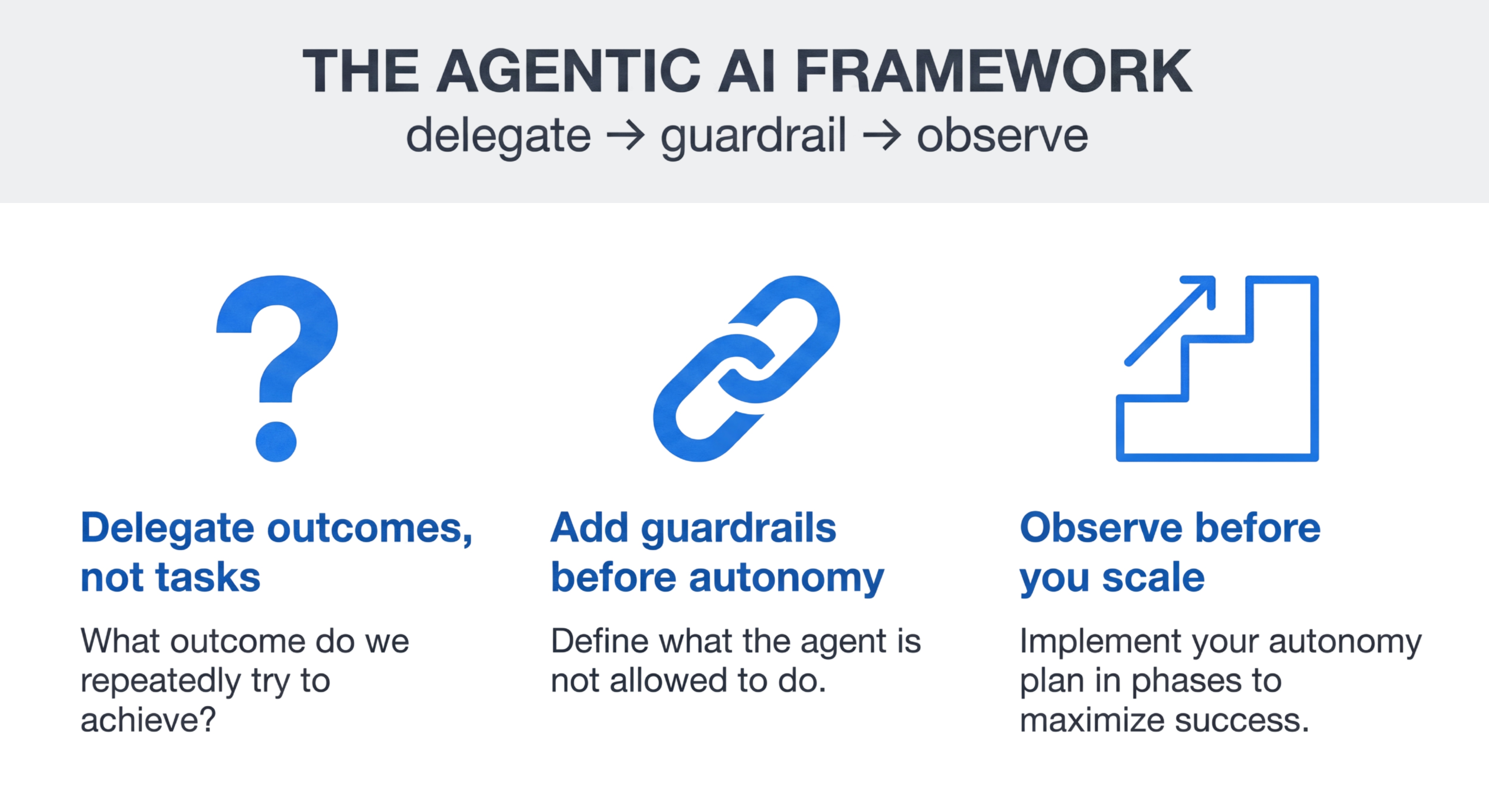
The agentic AI framework: Delegate → guardrail → observe

Let’s see how a framework can help with implementation. The delegate, guardrail, observe paradigm is both lean and sufficient to get the job done without massive disruption to your business.

1. Delegate outcomes, not tasks

Don't ask "What can this AI tool do?" Ask "What outcome do we repeatedly want to achieve?"

  • Bad delegation: "Write a sales email."
  • Good delegation: "Manage the follow-up process for all leads who haven't replied in 48 hours."

2. Add guardrails before autonomy

Agentic AI works best when it is constrained, not free roaming. You must define what the agent is not allowed to do.

  • Permissions: Can it draft the email, or send it?
  • Budget: Can it spend up to $50, or $0?
  • Escalation: "If the customer uses the word 'angry' or 'refund', stop and alert a human."

3. Observe before you scale

To eliminate faulty autonomous actions and tweak your agentic workflow early, start in "recommendation mode." Phase in your autonomy plan to avoid being surprised by outcomes.

  • Phase 1: The agent suggests an action ("I recommend sending this email"). You approve it.
  • Phase 2: You review the agent's logs weekly.
  • Phase 3: Once the agent is 99% accurate, you allow it to act autonomously.

Practical use cases: Focus on leverage, not magic

When implementing agents, we stop thinking about prompts (single interactions with AI) and start thinking about loops. We want to think in, and build, a cycle of goal → decision → action. 

Here are some examples of what this looks like in the real world.

1. Operations: The "inventory watchdog"

The agentic loop for our inventory watchdog would be rooted in monitoring your inventory database 24/7. The goal could be something like "prevent stockouts without manually checking spreadsheets daily." Then comes the decision: Is stock item A < threshold B? If yes, is the preferred vendor available? Finally comes the action: The agent drafts a purchase order and places it in your "to approve" folder. It creates the leverage; you provide the final sign-off.

2. Sales and CRM: The "lead nurturer"

The lead nurturer has an agentic loop of watching incoming leads and CRM activity. Its goal? To ensure no lead goes cold. The decision could be a simple set of rules such as: Has this lead responded in 3 days? If no, send follow-up #1. If yes, analyze the sentiment. Is it positive or negative? If positive, the action could be to schedule a meeting on your calendar. If negative, tag as "not interested" in the CRM to keep your data clean.

3. Finance: The "invoice chaser"

The agent's loop. Scan unpaid invoices. The goal would be to reduce the number of days sales outstanding (DSO). The decision: Is the invoice 5 days overdue? Send a polite reminder. Is it 30 days overdue? Draft a sterner email and flag it for the CFO. And finally, the action would be for the agent to automatically manage the follow-up cadence, ensuring cash flow isn't disrupted by human forgetfulness.
 

Reality check: What agentic AI is not

To prevent disappointment, limitations should be clearly outlined. Despite its robust capabilities, agentic AI is not a silver bullet. It won’t fix broken processes. If your current invoicing process is a mess that no one understands, an AI agent will automate the mess. Agentic AI also requires ownership. As the process manager, you are responsible when the agent makes a mistake. Remember this agentic golden rule: If a process is unclear to a human, it will be unclear to an AI agent.
 

Getting started: A sensible entry path

Don't overhaul your entire company overnight. You should treat your experimentation with agentic AI as a pilot program. First, identify one boring workflow. Pick something rules-based, repetitive, and low-risk, such as categorizing support tickets or checking for missing receipts. Then, document the decision points in the workflow by writing down exactly how you make the relevant decisions (e.g., "If X then Y"). Make sure you define evaluation metrics as well to assess outcomes.

Time to implement. Start with limited autonomy: allow the agent to draft the work, but require human approval before completing the action, such as "send" or "finalize." Once this is done, you measure outcomes. Was there a measurable positive impact on your business results? Did you save time? Did consistency improve? Did you increase revenue? Success begets success. Once you see the possibilities of agentic AI in your own business, practical success can follow by repeating this incremental approach.


The strategic takeaway

Over the coming few years, the competitive gap between small businesses won't be about who uses AI; it will be about who delegates effectively to it. Agentic AI allows you to scale your execution, not just your ideas. It is the force multiplier that allows a team of five to operate with the consistency and capacity of a team of twenty.

Cloud 101 for business owners
Still unsure what the cloud means for your business? Learn what it is, what it isn't, and how it can cut costs and boost business agility.
Cloud 101 for business owners
08-13-2026
Cloud 101 for business owners

If you've been hearing about "the cloud" for years but still aren't sure what it means for your business, we get it. Let's cut through the noise.

Put simply, cloud computing (aka “the cloud”) is renting computing power instead of buying it. Rather than purchasing servers, software licenses, and IT gear that sits in your office, you access these resources over the internet on a pay-as-you-go basis.

It’s like switching from owning a car to using rideshare. You still get where you need to go, but someone else handles maintenance and repairs while you focus on running your business.


What cloud computing IS
Cloud computing delivers servers, storage, databases, and software over the internet on-demand. Instead of investing in expensive hardware that becomes outdated, you access resources as needed from cloud providers. The three main types are Infrastructure as a Service (IaaS), Platform as a Service (PaaS), and Software as a Service (SaaS).

For most businesses, SaaS applications like email, accounting software, or CRM tools are your first cloud experience. These web-based apps eliminate software installations and provide automatic updates. All you need to do is select the provider that fits your needs, and their software is available for your business to use nearly instantaneously.


What cloud computing ISN'T
Cloud computing isn't just storing files online, though that's often where you start. It's also not a magic solution that automatically fixes all IT problems. Many business owners worry about security, but reputable cloud providers often offer better security than most small businesses can implement on their own.

Cloud computing also isn't necessarily more expensive. While costs vary based on services, resources, and usage, many businesses find significant savings by eliminating hardware purchases, maintenance contracts, and extensive IT staff needs.


Why the cloud actually makes sense for your business
Immediate cost relief: You can achieve over 35% in annual operating cost savings by deploying cloud services. This is accomplished by eliminating large upfront expenses for hardware and software, reducing IT maintenance costs, and only paying for what you actually use.

Business agility that works: The cloud lets you scale resources up or down based on actual demand rather than planning for peak capacity year-round. Busy season? Increase computing power instantly. Slower periods? Scale back and reduce costs. This flexibility is gold for growing businesses that can't predict future IT needs.

Real disaster recovery: Cloud providers store your data in multiple locations, offering better disaster recovery than most businesses achieve independently. Power outage, flood, or other disruption? Your data and applications remain accessible from any internet connection. Many cloud services provide 99.9% or better uptime guarantees.


The hard truth about getting started
Before moving to the cloud, it’s imperative that you assess your current IT costs including hardware, software licenses, maintenance, and staff time. Consider your growth projections and whether your current systems can scale appropriately.

Start small with one or two applications rather than attempting a complete migration immediately. Many businesses begin with email or file storage services before moving critical applications to the cloud. This gradual approach builds confidence while minimizing risk.

Work with experienced partners who can guide you through the decision-making process. Look for providers who offer comprehensive support, transparent pricing, and proven expertise across multiple cloud platforms. The right partner helps you understand not just what's possible, but what makes sense for your specific situation.

Cloud computing isn't about following technology trends. It's about positioning your business for sustainable growth while reducing operational complexity. When implemented thoughtfully, cloud services provide the foundation for innovation, efficiency, and competitive advantage.

The SMB opportunity is changing. Is your business ready?
Discover the biggest SMB growth opportunities for resellers, from AI and security to recurring revenue and professional services.
The SMB opportunity is changing. Is your business ready?
08-13-2026
The SMB opportunity is changing. Is your business ready?

For years, many technology resellers have viewed the SMB market as a volume play—competitive hardware deals, transactional software sales and tight margins. But today's SMB customers are changing, and with that change comes a significant opportunity for partners willing to evolve alongside them.

Small and midsize businesses are investing in technology differently than they were just a few years ago. They're looking for solutions that help them operate more efficiently, strengthen security, support hybrid work and unlock the benefits of AI. More importantly, they're looking for trusted advisors who can help them navigate these decisions.

The question isn't whether SMB customers are spending on technology. It's where they're spending and how partners can position themselves to capture more of that investment.


The rise of recurring revenue.

One of the biggest shifts happening in the SMB market is the move toward recurring revenue models.

Cloud subscriptions, managed services, security monitoring, device lifecycle management and AI services all create opportunities for partners to build predictable revenue streams while delivering ongoing value to customers. SMBs increasingly prefer technology solutions that are easy to consume, scalable and supported by experts they trust.

For resellers, this means moving beyond one-time transactions and identifying opportunities to attach services, support and recurring solutions that deepen customer relationships over time.

The most successful partners aren't simply selling products. They're building practices around outcomes.


AI is creating new conversations.

Nearly every SMB customer has questions about AI.

Some want to improve productivity. Others want to automate repetitive tasks. Many are trying to understand where AI fits into their business at all.

The good news is that SMB customers don't need complex AI strategies to see value. Most are looking for practical use cases that help employees work smarter, save time and make better decisions.

This creates a natural opportunity for partners to lead conversations around AI readiness, data management, governance, device modernization and productivity solutions. The partners that can simplify AI for SMB customers will be well positioned to grow alongside them.


Security is becoming a business priority.

Not long ago, cybersecurity was often viewed as an IT issue. Today, it's a business issue.

SMB customers understand that a security incident can impact operations, customer trust and revenue. Yet many still lack the resources or expertise needed to manage an increasingly complex threat landscape.

This creates opportunities for partners to deliver more than products. Security assessments, managed security services, identity protection, networking security and compliance support are all areas where customers need guidance.

Security conversations also tend to open the door to broader technology discussions, making them one of the most effective ways to expand customer relationships and increase long-term value.


Workplace modernization is still a growth driver.

Many SMBs are running aging devices, outdated collaboration tools and fragmented technology environments that create friction for employees and IT teams alike.

As organizations continue to embrace hybrid work and AI-enabled productivity tools, modernizing the workplace has become more than a hardware refresh. It's an opportunity to improve employee experiences, strengthen security, simplify management and support future growth.

Partners that connect device modernization to broader business outcomes are finding new ways to expand opportunities beyond the initial sale.


Services are where relationships grow.

Ask successful partners where some of their most profitable opportunities originate, and many will point to services.

Whether it's cloud migrations, cybersecurity assessments, lifecycle services, deployment support, data readiness initiatives or ongoing managed services, professional services create deeper customer engagement and help uncover future opportunities.

Services don't just increase revenue. They help establish credibility, build trust and position your business as a strategic resource rather than a technology supplier.


Turning opportunity into action.

The SMB market isn't standing still. Customers are adopting new technologies, facing new challenges and looking for partners who can help them move forward with confidence.

That's exactly why we created the SMB Growth Hub.

The SMB Growth Hub brings together practical growth strategies, solution guidance, training resources and ready-to-use programs designed to help you identify new opportunities and expand your SMB business. Whether you're focused on growing recurring revenue with Microsoft Cloud, monetizing AI, leading with security, modernizing workplaces or building professional services practices, you'll find actionable resources built specifically for technology resellers.

The opportunity is already here. The question is where you'll start.

Visit the SMB Growth Hub

The ABCs of AI for SMBs
Finding the right AI solution for a SMB can be hard—but it doesn’t have to be. We’ve mapped out what to know and how to get started.
The ABCs of AI for SMBs
08-13-2026
The ABCs of AI for SMBs

Let’s talk about overcoming reservations, understanding your options and leveraing AI to align with specific business goals.

AI helps businesses simplify, automate and improve business outcomes, but it is not meant to be the only thing your company relies on.

For SMBs, this message is: AI is for everyone. There are two main variations of AI that many businesses choose from—assistants and agents. Think of assistants as tools that respond when you ask for help—drafting emails, summarizing meetings or generating content. Agents go a step further by carrying out defined workflows with minimal intervention, such as qualifying leads, managing customer onboarding or routing support requests.

But making investments into your business with the right AI is not a simple decision and shouldn’t be made based on hype alone.

To add AI to your business toolbox, you’ll need ABC-style guidance and we’re here to provide just that.

A—address your concerns, overcome your objections and dispel misconceptions.

B—build your understanding of the AI landscape and discover your right-fit options.

C—connect the right AI tools to the business outcomes that you’re trying to achieve.

Addressing concerns

Let’s start with the common reservations many SMBs have for adopting AI into their business. Some of the most common questions we’ve heard are:

  • Is AI safe for my business?
  • Do I need a technical team?
  • What if no one on my team knows how to use it?
  • Can my business actually afford AI?

While these are all valid questions, they do have answers.

Media headlines like to paint AI as a safety risk when it comes to data exposure, workforce reductions, morality and environmental sustainability. And we certainly can’t guide your moral compass, but we can dispel some of the rumors. Many of these concerns can be remediated through having conversations with real businesses utilizing AI tools right now. Ask questions, engage in dialogue and gain a better understanding of the impacts businesses are seeing from using AI. Additionally, piloting AI tools for free is another great way to determine if it’s a good fit for your business. Try it before you buy it, as they say.

As far as engaging in a formal technical team—no, you don’t need that. AI isn’t as inaccessible and complicated as it used to be. It no longer requires multiple team members in rotating shifts to implement and maintain it. All you need is someone willing to learn—and there are plenty of both paid and free tools for your team to leverage. While it does take a little bit of time to learn the AI tool and develop some level of skillset to master it, you don’t need to be an AI expert to implement it in your business.

AI affordability is relative. Enterprise-grade, customized, multi-agent AI systems are expensive. But smaller models, even lightweight agents, can be affordable and achievable for every SMB. Remember, AI is an investment in your business—so you get to decide how much money you’re comfortable spending on this business aide.

As Michael Wier, technical enablement architect at Ingram Micro says, “AI is a much more mature market now and the past fears of investing into the technology without much of a return is not as big of a concern as it used to be. Success is seen much sooner.”

Building an understanding of the AI landscape

Exploration is key in navigating AI. The more you explore, the more you will discover what feels right and what doesn’t work. Before you start exploring, there are two main questions you need to consider:

1. What is the return on investment (ROI) and how long will it take before I see it?

2. Am I getting innovation in return?

ROI is an important factor in every business decision. But ROI can mean different things to different people. Sure, there’s a real financial benefit to implementing AI. Time is also a form of ROI that matters. How much time are you getting back in your day because of AI?

There’s also an innovation benefit that becomes realized when you allow AI to assist in taking over tasks, giving room for your business to do things it hasn’t done before.

AI is built for pattern recognition. It can produce some incredible results for your business that humans wouldn’t naturally think of, or take a long time to discover. And that benefit is absolutely worth focusing on, too.

Here are the main things you need to keep in mind when finding the right AI tool:

  • Set realistic goals and find the right AI tool to achieve said goals. The focus should always be on the outcomes you’re hoping to achieve with AI—this is the most important thing to remember.
  • Have perspective—you shouldn’t expect AI to come into your business and perform a miracle. Stay grounded and remember it’s just a tool.
  • Pilot your options. Almost every AI solution on the market today has a free tier or low-cost option that you can try.

Connecting AI solutions to outcomes

Think of AI along the same lines of having a successful employee—it fulfills the role or task it is assigned and does it well. Aim for the ROI or the innovation you want immediately. Give it time—but not too much time. In roughly 6 months, you should have a good idea if it’s achieving the goal you’ve set for it. Just don’t let it become a money pit or waste of time.

While there are some simplistic, plug-and-play agentic AI solutions on the market where you can pick a task and implement an agent with a few clicks, it’s always good to ensure your investment is going towards an agent that is designed for your business with your customizations. Using an off-the-shelf AI solution is akin to everyone hiring the same person—it might get the job done, but it won't reflect your processes, your expertise or what makes your business different.

Again, think of those outcomes. Instead of searching for an AI agent, search for a client onboarding assistant that answers common questions 24/7 while your team focuses on serving customers. Instead of automating everything, automate repetitive tasks so your team can spend more time building relationships and growing the business. Placing your value in the AI tool on actual outcomes you want to achieve is the best approach in finding the right one for your business.

AI doesn't have to be intimidating, expensive or all-encompassing. Start with a challenge you want to solve for and explore the tools available. The businesses seeing the greatest success with AI aren't chasing every new trend—they're making thoughtful investments that solve real problems. When you’re ready to take the step in customizing your AI tool, Ingram Micro is here to help.

Explore AI Solutions

Cybersecurity for the modern business
Keep your business secure in a rapidly changing world with practical tips and insights.
5 things you need to know about cybersecurity
Let’s talk about the biggest things you need to know about cybersecurity right now and how to stay ahead of threats.
5 things you need to know about cybersecurity
08-13-2026
5 things you need to know about cybersecurity

Cybersecurity is one of those topics that is constantly evolving and everyone has to be flexible, as the cyber enemies get smarter and more adaptable to the new technologies and security features. Despite the constant need to stay informed and on guard, there are things you can do to adopt healthy habits to keep your customers (and even your own businesses) in a good security position.

1. Adopt AI to help defend, but watch for AI-driven scams.

Artificial intelligence and machine learning have been rooted in cybersecurity for a while now, but GenAI is a force multiplier for cyberenemies to carry out their agenda. They leverage AI to create fake invoices, impersonate a trusted authority or launch sophisticated phishing campaigns—to name a few.

This is an official warning for your customers to be wary of any voice, video or correspondence asking for sensitive data or exhibiting urgent language. Your customers can still use AI-powered email gateways, endpoint detection and cloud security tools to help spot suspicious activity.

2. Train and empower staff.

I’ve said it before and I’ll say it again—the first line of defense will always be the internal team. People are a key part of any good defense, but they can also be the most vulnerable. They make mistakes, fall for scams or simply ignore security best practices. Even the best technical controls can be undermined if users don’t do the basics.

  • Conduct recurring security awareness training.
  • Teach their employees how to verify links, files and attachments.
  • Encourage them to report suspicious behavior.
  • Reward them for their efforts when it comes to doing the right thing and making security part of the company culture.

And you can always have your customers send out those practice phishing training emails like we do here at Ingram Micro. They’re very effective in teaching us non-security personnel to be on guard and mindful when opening emails (though it may make folks suspicious of every email, like me…)

3. Plan for compliance and new regulations.

This is a complex topic that will vary depending on the industry/customer and location, so this will be a general explanation.

  • Privacy and information laws are constantly evolving. You need a strong understanding of what data your customers store, where it lives and who has access—and they should, too.
  • Falling out of compliance can result in legal, reputational and financial consequences. It’s best to ensure that you both document incident response and business continuity plans.
  • Make sure your plan with your customers includes proper communication, insurance and legal steps if necessary.
  • Organize tabletop exercises with stakeholders to simulate different scenarios.

Think of it like those fire drills we had in grammar school—know the plan, practice the plan and ensure stakeholders on your customers’ teams know what to do should there be a situation.

4. Build a layered approach–also known as “defense-in-depth.”

Attackers will target vendors, third parties and software dependencies as an indirect path to compromise businesses of all sizes. Don’t let your customers put all their eggs in one basket. Here are some quick tips to save you future headaches:

  • Actively manage your vendor relationships.
  • Adopt a comprehensive, diverse set of protections that aligns to a cybersecurity framework, such as NIST.
  • Turn on multi-factor authentication (MFA) everywhere.
  • Use least privilege or role-based access controls across systems.
  • Run vulnerability scans.
  • Back up data and test recovery on a regular basis.

It’s almost like you have to be a doomsday prepper—stocked up and ready to defend cybersecurity posture at any given second. The more palisade defenses you have, the better prepared you are to handle it when the cyber enemies try to show up.

5. Stay informed.

Cybersecurity moves fast, and this list might have changed by the time you finish your morning cup of coffee or tea. Be curious. Subscribe to newsletters. Attend webinars. Keep an eye on the headlines. Incorporate threat intelligence feeds into your day-to-day operations. Be the kind of person who is constantly seeking information on the latest threats, the newest technologies and best practices as we uncover the cyberenemies’ plans.

Of course, you can always call your Ingram Micro representative and we’ll walk you through anything you might need a little extra help with. If there’s a security topic you want to dive deeper into with one of our cybersecurity or AI experts, reach out today.

Dive deeper into cybersecurity

Shifting from prevention to resilience: why backups and redundancy matters
Do your customers have a strong cyber resilience plan? We’ll show you how the shift from prevention to resilience is the new trend and why.
Shifting from prevention to resilience: why backups and redundancy matters
08-13-2026
Shifting from prevention to resilience: why backups and redundancy matters

Prevention is still needed—but so is resiliency.

The baseline assumption is that everyone has been selling prevention like it’s the only thing that matters, focusing on stopping hackers and the bad guys from getting in and preventing attacks from ever happening. But that’s a silly way to do business when that’s not a guarantee of never being compromised.

Why resilience matters

Just for a second, let’s assume that protection is not 100%. Can it prevent with a loss-protection guarantee, dollar for dollar, from being breached? No. None of them offer that. Because every single day, someone somewhere is cooking up a new virus or trojan horse to compromise your environment, and no protection is ever going to promise a money-backed guarantee of absolute prevention. Protection also doesn’t prevent you from losing everything in a really bad storm, a flood, a fire, a hurricane or even a tornado.

That’s why every business, even SMBs, need to assume their protection isn’t 100% and start preparing for recovery.

Startups, SMBs and even state, local, education sectors are often the most impacted by having disaster recovery and backup plans. They’re just one bad natural disaster or breach away from being out of the game for weeks—or even permanently.

So, now the conversation with our customers need to shift from, “Let’s get you prevention and protection,” to, “It’s time to talk about resiliency.”

The UK government released a report last year that stated nearly half of businesses in the UK reported a cybersecurity breach or attack in the past year, yet fewer than one in four of these businesses have a formal incident response plan. While the U.S. hasn’t released a directly comparable report, the gap between cyber risk and cyber readiness likely looks similar here, too.

Without physically sounding the sirens, planning for the worst case scenario is imperative for every organization. It’s not just about security breaches and natural disasters. What happens if someone in your organization loses or breaks their laptop? What if that someone is managing an important financial or HR report and it’s not backed up and saved somewhere else? It sounds dramatic, but not having cyber resiliency can literally make or break a business.

How to start

Building a cyber resiliency plan will look different for every organization, but a few things remain the same across the board. To have a strong cyber resilience, every organization needs to consider the following:

  • Understand and anticipate the primary threats and reducing exposure.
  • Being able to withstand and continue business operations while something is going on.
  • Having a post-event recovery plan, including knowing how to restore systems as quickly as possible and with integrity, and being able to reflect on what was learned and how that knowledge can be incorporated into the business for the future.

An important note to make here is that resiliency planning should be ongoing—infinitely. You can’t just do a little resiliency planning one time, update it three years later after an event and hope for the best. This needs to be a standard part of every organization’s security posture.

What is needed

Now that we have a good understanding of why resiliency is important and how to get started, let’s jump into what a good resiliency plan looks like.

Firstly, every good resiliency plan includes a backup solution. Backups should include, at bare minimum:

  • Files
  • Metadata
  • System configuration information
  • Backing up entire systems, physical or virtual, whenever possible

Ideally, a good solution should be automated backups, but it’s still important to train staff on how to save and where to ensure important things land in multiple places.

In addition to backups, your resiliency plan should also include:

  • Identity Access Management (IAM) tools that are reevaluated and updated often.
  • A game plan that reduces the blast radius, or limits the short- and long-term effects, like network segmentation, zero trust and firewalls.
  • Redundancy and recovery that includes immutable backups and geographic location disbursement of those backups and networks.

For some reason, redundancy and recovery is one of the most underinvested solutions in recent times, but it should be a core architectural default for businesses. And ensuring geographical disbursement is also key, so if a natural disaster were to hit, you’re not stuck in a bind.

Where to go next

Another important consideration is measuring resilience. Historically, we measure it by security activity. But we need to start considering the metrics around resiliency by its own merits. This would encompass how fast an organization can get back up and operational after an event and how fast we can detect that something has happened.

Conducting resilience practice drills and tabletop exercises are a great way to understand how an organization is prepared and how resilient they are. These also should be mandatory and performed on a biannual basis at the very least.

Mark Fermin, senior technical enablement engineer at Ingram Micro agrees. He says, “Data is the lifeline. It’s the lifeblood of all organizations. If an organization doesn’t have a solid resilience plan to ensure that data stays both safe and available, then they’re doing themselves a costly disservice.”

And don’t forget about the team. IT is just one layer of an organization. Every single employee matters and education and awareness of what to do should things go sideways is imperative. Documenting the process of how to access backups and how to remain operational in a crisis should be top priority—and having multiple people on the team who can access and resurrect the systems is non-negotiable.

Ingram Micro has a team of resiliency experts ready to help walk you through all of this, specifically for you and your customers’ needs. Start the conversation and build the plan with our team today.

Learn more about cyber resilience
Build or buy your cybersecurity? Weighing the pros and cons
Learn the pros and cons of in-house cybersecurity teams vs. expert partners, and how to strengthen your defenses now.
Build or buy your cybersecurity? Weighing the pros and cons
08-13-2026
Build or buy your cybersecurity? Weighing the pros and cons

The new million-dollar question for cybersecurity doesn’t have anything to do with fending off the latest type of attack or adopting yet another AI-powered tool. It’s all about whether you build your own cyber army or team up with the pros.

The choice is important, as it affects your budget, your daily operations, and how fast you can fight back when threats emerge.

Building your own cybersecurity team

The good stuff: You're in the driver's seat. Your people know your business inside and out, so they build security that fits how you work. When something goes wrong, they're right there, with a potential response time of zero . The quicker a breach is contained, the cheaper it is to fix. Breaches lasting more than 200 days cost over a million dollars more than those resolved faster.

Plus, once you've got your team hired and set up, you have dedicated resources focused solely on your organization. For larger organizations with complex security requirements, direct control and deep business integration can justify the investment.

The hard truth: From incident response experts to penetration testers to threat intelligence analyst, you will likely need a number of these six-figure salary specialists. Add in compliance gurus and insider risk management experts and you have yourself an effective, but expensive, dedicated security team. At this point, you haven’t even considered the tools of the trade and your 24/7 monitoring infrastructure.

And here's the real kicker: cyber threats are changing daily. Keeping your team current means constant training, new certifications and upgraded tools. Those costs add up fast and can easily blow past your initial budget.

Partnering with security experts

The good stuff: Specialists in every area of cybersecurity, without the hassle of hiring. These providers run security operations centers with around-the-clock monitoring, threat intelligence, and enterprise-grade tools that could cost you a fortune to build yourself.

They’ve encountered every client scenario, every type of attack, and every compliance challenge. That experience means they know what works and what doesn't, so you get to skip the expensive learning curve . Better yet, managed services can be operational in weeks versus 12-18 months for in-house teams. With data breaches averaging $4.4 million, every month without full protection is a costly gamble.

The hard truth: You may have less direct control over security decisions, but the trade-off is that experts handle them for you . Some businesses also worry about sharing sensitive info with outsiders, but reputable partners maintain strict confidentiality and compliance certifications.

Finding what works

The smartest organizations don't pick sides; they figure out where their holes are and who's best positioned to plug them. Again, start with the basics: Are your employees trained to spot phishing? Is someone monitoring for insider threats? Can you patch critical vulnerabilities before they're exploited? Smart approaches blend internal awareness with strategic partnerships for specialized services.

Go with partners first if you're:

  • Small to midsize without security expertise
  • In heavily regulated industries needing specialized compliance knowledge
  • Growing fast and can't keep up with capability development
  • Want security frameworks up and running quickly

Build internally if you're:

  • A large organization with the budget for comprehensive security teams
  • In industries with unique requirements that standard services don't cover
  • Already have strong technical leadership to build security programs
  • Committed to long-term cybersecurity investment as a core business capability

How to make partnering work

Effective cybersecurity isn't about choosing one important aspect of certainty over others. A successful portfolio covers vulnerability assessments, penetration testing, managed firewall services, incident response, and compliance consulting — all designed to work with whatever capabilities you already have.

Industry-certified professionals bring specialized knowledge and advanced infrastructure to help protect your business. From social engineering assessments to forensic incident response, a properly selected partner can be your security advisor at every stage.

Security operations centers monitor threats 24/7, while consultancy services help develop internal capabilities and security awareness programs. You can start by relying on external support while building internal expertise or supplementing your existing team with specialized services. It’s your choice.

Stop overthinking, start protecting

The right cybersecurity approach depends on your size, industry, budget and risk tolerance. Consulting with security professionals can help you decide how to build a strategy that fits your business needs and growth plans. But here's what matters most: acting now instead of debating the perfect solution while cybercriminals are already targeting your vulnerabilities.

Are you ready to strengthen your defenses?
Understanding the cost of one compromised account
See how one compromised account triggers a domino effect of data loss and financial damage. Protect your business from cascading cyber risks now.
Understanding the cost of one compromised account
08-13-2026
Understanding the cost of one compromised account

A single weak password might seem like a minor IT headache, but the true cost of a compromised account extends far beyond a simple reset. As our infographic illustrates, one compromised login triggers an undesirable domino effect across your entire organization.

The journey begins with an initial compromise, often via stolen credentials, leading to unauthorized access and dangerous lateral movement. Once inside, attackers bypass defenses to access internal tools and files, resulting in significant data exposure or loss of intellectual property. This disruption forces system shutdowns and halts productivity, but the total cybersecurity business impact doesn't end there.

Even after the technical incident is "resolved," the long-term fallout includes brand damage, compliance costs, and trust erosion. By understanding these cascading risks, you can better fortify your defenses and protect your bottom line from long-term reputational harm. Don't let your company suffer the layered outcomes of preventable data breaches.

Download Infographic

AI insights to get you ahead
Stay ahead of the curve with the latest AI tips and developments.
What every small business needs to know about agentic AI
Agentic AI for small businesses: Move beyond chatbots to systems that monitor, decide, and act to improve consistency and team leverage.
What every small business needs to know about agentic AI
08-13-2026
What every small business needs to know about agentic AI

If your experience with AI so far has been asking ChatGPT to draft an email or summarize a meeting, then you are familiar with the power of generative AI. Generative AI, as experienced using traditional chat-style interfaces, has proven to be an incredibly useful tool. Still, it has a major limitation: it sits there and waits for you to type.

We are now entering the next phase of the technology: Agentic AI, which can seamlessly integrate with your existing systems like CRM, email, and spreadsheets, addressing common technical concerns for small businesses.

For small business owners, this distinction is critical. It's about giving small teams a sense of empowerment and confidence by starting small with pilot projects that let software initiate, decide, and act within clearly defined boundaries. This takes AI from passive observer to active participant. However, it isn't about replacing employees or deploying sci-fi autonomy; it's about augmenting your current workforce.

You can think of it this way:

  • Generative AI is a tool, such as a typewriter or a calculator
  • Agentic AI is a system, such as a workflow or a delegation

Agentic AI is the difference between software that waits for instructions and software that gets things done.
 

Agentic AI is your junior assistant

Technically, agentic AI refers to systems that can take a high-level goal, break it down into steps, use tools (like your email, CRM, or spreadsheets), make intermediate decisions, and act repeatedly until the goal is met.

But this sounds abstract. To understand how this fits into your business, don't compare it to software; instead, compare it to a junior operations assistant.

Imagine hiring a bright, junior employee. You wouldn't just say "write this email." Instead, you might say, "Check our inventory every morning. If stock is below 10 units, draft a reorder form, but if it's below 5 units, mark it as urgent and Slack me immediately."

A junior assistant can:

  • Check systems - look at inventory
  • Follow procedures - compare against the 10-unit rule
  • Make decisions - standard reorder vs. urgent escalation
  • Escalate - when a situation calls for it, or if unsure of what action to take

Agentic AI does exactly this. It doesn't just talk; it does.
 

Why this matters specifically for small businesses

Enterprise companies solve problems by throwing headcount at them. Small businesses don't have that luxury, and may face specific constraints:

  • The many hats problem: Your best salesperson is also your support lead and occasionally your IT fix-it person
  • Trapped knowledge: Critical processes exist only in the owner's head
  • Inconsistent execution: You know what to do, but because you are busy, it doesn't always get done

The value proposition here is non-technical. Agentic AI isn't about making your business "smarter" in a creative sense; it makes your business more consistent. 
 

The agentic AI framework: Delegate → guardrail → observe

Let’s see how a framework can help with implementation. The delegate, guardrail, observe paradigm is both lean and sufficient to get the job done without massive disruption to your business.

1. Delegate outcomes, not tasks

Don't ask "What can this AI tool do?" Ask "What outcome do we repeatedly want to achieve?"

  • Bad delegation: "Write a sales email."
  • Good delegation: "Manage the follow-up process for all leads who haven't replied in 48 hours."

2. Add guardrails before autonomy

Agentic AI works best when it is constrained, not free roaming. You must define what the agent is not allowed to do.

  • Permissions: Can it draft the email, or send it?
  • Budget: Can it spend up to $50, or $0?
  • Escalation: "If the customer uses the word 'angry' or 'refund', stop and alert a human."

3. Observe before you scale

To eliminate faulty autonomous actions and tweak your agentic workflow early, start in "recommendation mode." Phase in your autonomy plan to avoid being surprised by outcomes.

  • Phase 1: The agent suggests an action ("I recommend sending this email"). You approve it.
  • Phase 2: You review the agent's logs weekly.
  • Phase 3: Once the agent is 99% accurate, you allow it to act autonomously.

Practical use cases: Focus on leverage, not magic

When implementing agents, we stop thinking about prompts (single interactions with AI) and start thinking about loops. We want to think in, and build, a cycle of goal → decision → action. 

Here are some examples of what this looks like in the real world.

1. Operations: The "inventory watchdog"

The agentic loop for our inventory watchdog would be rooted in monitoring your inventory database 24/7. The goal could be something like "prevent stockouts without manually checking spreadsheets daily." Then comes the decision: Is stock item A < threshold B? If yes, is the preferred vendor available? Finally comes the action: The agent drafts a purchase order and places it in your "to approve" folder. It creates the leverage; you provide the final sign-off.

2. Sales and CRM: The "lead nurturer"

The lead nurturer has an agentic loop of watching incoming leads and CRM activity. Its goal? To ensure no lead goes cold. The decision could be a simple set of rules such as: Has this lead responded in 3 days? If no, send follow-up #1. If yes, analyze the sentiment. Is it positive or negative? If positive, the action could be to schedule a meeting on your calendar. If negative, tag as "not interested" in the CRM to keep your data clean.

3. Finance: The "invoice chaser"

The agent's loop. Scan unpaid invoices. The goal would be to reduce the number of days sales outstanding (DSO). The decision: Is the invoice 5 days overdue? Send a polite reminder. Is it 30 days overdue? Draft a sterner email and flag it for the CFO. And finally, the action would be for the agent to automatically manage the follow-up cadence, ensuring cash flow isn't disrupted by human forgetfulness.
 

Reality check: What agentic AI is not

To prevent disappointment, limitations should be clearly outlined. Despite its robust capabilities, agentic AI is not a silver bullet. It won’t fix broken processes. If your current invoicing process is a mess that no one understands, an AI agent will automate the mess. Agentic AI also requires ownership. As the process manager, you are responsible when the agent makes a mistake. Remember this agentic golden rule: If a process is unclear to a human, it will be unclear to an AI agent.
 

Getting started: A sensible entry path

Don't overhaul your entire company overnight. You should treat your experimentation with agentic AI as a pilot program. First, identify one boring workflow. Pick something rules-based, repetitive, and low-risk, such as categorizing support tickets or checking for missing receipts. Then, document the decision points in the workflow by writing down exactly how you make the relevant decisions (e.g., "If X then Y"). Make sure you define evaluation metrics as well to assess outcomes.

Time to implement. Start with limited autonomy: allow the agent to draft the work, but require human approval before completing the action, such as "send" or "finalize." Once this is done, you measure outcomes. Was there a measurable positive impact on your business results? Did you save time? Did consistency improve? Did you increase revenue? Success begets success. Once you see the possibilities of agentic AI in your own business, practical success can follow by repeating this incremental approach.


The strategic takeaway

Over the coming few years, the competitive gap between small businesses won't be about who uses AI; it will be about who delegates effectively to it. Agentic AI allows you to scale your execution, not just your ideas. It is the force multiplier that allows a team of five to operate with the consistency and capacity of a team of twenty.

Securing generative AI
How do you secure generative AI? We’ll help you understand what you need to know.
Securing generative AI
08-13-2026
Securing generative AI

So you have generative AI—now what?

Generative AI (GenAI) is going for gold and making Olympic leaps and bounds to be the go-to model of AI that every business wants their hands on. And it’s definitely worth the hype—it’s the more affordable AI solution and it can definitely transform the way we all work. But like every new technology, you need to have a solid security plan to avoid being targeted by hackers.

Before we dive into the topic of securing GenAI, we first must understand the difference between private and public instances. Public GenAI uses data from the internet to generate answers. They also model log prompts and often use them to retrain. Private GenAI is a more controlled version of public, as it can be trained to pull information from a business specifically with governed data flows. They can also be fully isolated and not connected to the public internet at all.

Now that we’ve got that out of the way, there’s a few common risks of GenAI models that AI developers need to understand:

  • Model inversion—Did you know that attackers have been known to try to extract information about the training data from the model itself? Yikes. This could expose sensitive training data like customer records.
  • Data—If a hacker can get into your model, what can they learn from it? What kind of information would they then have access to? It’s important to know the answers to these questions before data is fed to any GenAI model.
  • Prompt injection—Hackers can manipulate models by pushing guardrails with prompts. Yes, using your own guardrails against you. This could override instructions and leak internal information.
  • Data poisoning—Hackers can also modify or inject malicious data into the training dataset so the model learns incorrect behavior. This could cause AI-generated outputs to become unreliable or harmful.
  • Data exfiltration—This is the act of accessing and stealing sensitive data through phishing, misused privileges and the like. You know, traditional cybersecurity risks.

Alright, housekeeping checklist is complete. Let’s talk about how you can protect your specific model of GenAI.

Securing private models

The most common approach to securing private GenAI models is actually just following the industry standard strategies and frameworks. These include governance, risk and compliance (GRC) strategies. Following the EU AI Act for international standards is also a great move, too. Here are a few more:

  • Have a strong data collection process—Know your data. Don’t just take it from any old public source. Guard it like your business depends on it (because it does).
  • Get a good AI security software—There are options out there that help you monitor data analytics and govern your AI models. This could look like AI model monitoring or anomaly detection, data leakage prevention, prompt security tools and transparency or traceability platforms. Of course, our Ingram Micro experts can help you find the right one for your customers’ specific model and needs. And all of these options do not require a specific AI model.
  • Set up guardrails—I know I just told you that your guardrails are vulnerable, but don’t let that stop you from setting them up. You still want to do everything in your power to protect sensitive data.
  • Partner with a great, trustworthy infrastructure partner—There are so many options out there to help you with your infrastructure. The biggest ones are AWS, Azure, Google and IBM. But they all have strong reputations for secure infrastructures and you truly can’t go wrong with any of them.

Securing public models

Considering that people are using these from public domains, there’s not a whole lot that you can do as a service provider or a business to securing the GenAI models themselves, but you can educate your customers and their staff on how to use them safely.

The number one rule for using a public GenAI model is to be very careful what you put into it. It is meant to provide you with answers using publicly available internet resources, remember? So, you should never ask it to review important and sensitive information like spreadsheets or contracts. Don’t ever feed it anything with credit card information or personal details.

To that point, public GenAI also can get it wrong. Never rely on them for legally binding or sensitive business decisions.

Many businesses opt to block their employees from using public GenAI models as a just in case, and that’s not a bad idea. But so long as your customers and their staff understand that prompts and outputs could indirectly influence model behavior or future training data, they should be okay to use these models in moderation.

Key takeaways

AI is an incredible opportunity for businesses of all shapes and sizes to streamline workflows, obtain more productivity and reach ultimate efficiency. But like everything linked to technology, it’s not exempt from cyber attacks.

Here’s a quick summary of what everyone with GenAI needs to do to keep it secure:

  • Understand how AI handles data—where data and prompts are stored, whether the model is trained on that data and who can access it.
  • Humans are still needed— ensure people provide oversight for AI-generated decisions and maintain accountability.
  • Check it often—AI isn’t perfect. Follow your standard cybersecurity policies, monitor outputs regularly and use auditing tools where possible.

Farhan Chowdhury, Ingram Micro senior technical enablement engineer, explains it like this: “Generative AI should be treated like any other enterprise application. It requires the same security discipline—governance, monitoring and controlled access to ensure it delivers value without introducing unnecessary risk.”

Personally, I think AI is here to stay and we need to embrace it. But most importantly, we need to treat it like any other technology tool and ensure that we don’t give hackers more access to the things we don’t want them to have. Zero trust, right?

When you’re ready to dive deeper into this conversation to figure out what kind of additional security softwares you’d like to explore for your customers, our team of AI experts are here.

Learn More
3 things enterprise organizations need to know about AI
Enterprise organizations want AI—but what do they need to know before they get started? Explore the basics and beyond with Ingram Micro.
3 things enterprise organizations need to know about AI
08-13-2026
3 things enterprise organizations need to know about AI

The basics and beyond—understanding AI through an enterprise lens.

No matter how big or small a company is, everyone can benefit from incorporating AI into their daily workflows. We’ve talked a lot about how SMBs can get on the AI train, but what about enterprises?

Here are 3 things every enterprise level business needs to know about AI:

AI is customizable.

If you have the budget, we can help you build any AI solution. The key is understanding the outcome your customer wants. Ideally, AI is supposed to alleviate repetitive and redundant tasks to complement the humans in office.

There are three levels of AI: entry level, mid-tier and high-end. Entry level AI solutions are essentially plug and play—simply buy a license and have AI capabilities. Mid-tier is where you get more involved—creating AI solutions that increase efficiency by removing simpler tasks from busy plates. High-end is the most extensive—automating as much as possible and leaving QA for the humans.

Many businesses, including SMBs and enterprise organizations, opt for the entry level AI solutions. But enterprises with bigger budgets, the ones looking to get the most out of AI, are all in for those mid-tier and high-end options.

Security and the AI market.

Security has high market value in the AI world. Businesses are using AI security solutions in two different ways: monitoring networks and monitoring AI solutions.

With AI, you can create and monitor a baseline for an entire network, as AI notices differentiations and can automatically shut down or isolate the affected systems to prevent spread of attacks.

Organizations also need to keep in mind that if they’re using AI, they’ll need a secondary, security-minded bot to ensure that chat bots and generative AI solutions don’t say or do anything they shouldn’t. For example, some schools are leveraging AI security functions to monitor their chat bots and limit what students can ask. Essentially, you want to protect your chat bot, and your users, from using AI for the wrong purposes. This also includes applying guardrails directly to AI solutions to ensure nothing leaks out and nothing nefarious creeps in.

How are enterprises using AI?

In the mid-tier world of AI, we’ve seen (and helped) many enterprise-level organizations create customized solutions, including:

  • Custom chat bots that place and track orders, provide responses to basic questions, handle appointment booking and more
  • AI-powered inspection solutions that review footage from body cams to catch anything the human inspector may have missed
  • Drones that take video surveillance and feed the footage into AI to catch anomalies

Medical field

During the COVID-19 pandemic, AI played a huge role in developing the vaccines and the speed at which we were able to receive them, helping to identify viral genomes with the best viability to be effective.

Other healthcare facilities are using chatbots for symptom analyses. In fact, chip manufacturers have libraries of all known and identifiable cancers and are using AI with radiology images to quickly assess. While licensed and trained doctors still review before giving official diagnoses, AI expedites the process.

Retail and warehouse logistics

Life is starting to look a lot like the picture of the future that shows like The Jetsons painted for us. We’re using AI to build robotics for warehouses, people. Humans are finally getting the help we need to stop abusing our bodies with heavy lifting, as robots take on tasks like loading, scanning, product picking, packing and shipping.

Automotive

For those with big budgets and high-end AI solutions, AI can build virtual cities as a training facility for self-driving vehicles. As autonomous cars flood the streets in some major city hubs, AI helps with city mapping and planning to anticipate every possible scenario. The future of travel looks like a big, bright open canvas for us to paint as we go.

We’re just at the beginning of understanding what’s possible with AI, and there’s so much more to come. If you or your customers are looking to add AI to your workflows, Ingram Micro can certainly help you map out what that looks like—whether you’re looking for entry level, mid-tier or even high-end solutions. If you can dream it, we can help you build it through AI.

Learn More
GenAI isn’t just for customers—MSPs can benefit from it, too. We’ll show you how.
Are you a MSP looking to transform your customer experience offerings through AI? We can help.
GenAI isn’t just for customers—MSPs can benefit from it, too. We’ll show you how.
08-13-2026
GenAI isn’t just for customers—MSPs can benefit from it, too. We’ll show you how.

How can you effectively sell something if you’re not using it, too?

Maybe it’s just me, but I think customers know the difference between a sales pitch and a genuine success story. And I’m willing to bet that those testimonies hold a heavier weight than a sales pitch.

So, if you want to really jump into the generative AI (GenAI) space, then I double dog dare you to implement it in your house first.

I’m sure your next question is, “How can GenAI really benefit my business as an MSP?” And don’t worry—we’ve got you covered. Here are just a few of the ways you can see impactful changes in your MSP business model by implementing GenAI:

  1. Acceleration of timelines. Did you know that GenAI lets MSPs build 24/7 natural-language front doors for support roles? Your team, or even your customers, can ask questions in plain English and get accurate answers sourced from your and your customers’ own documentation. “How do I reset my SSO?” “Why can’t I connect to VPN?” Asked and answered in minutes. This creates a faster response rate, fewer low-value tickets and even allows your humans to focus on higher-impact work.
  2. Instant upgrade for ticket quality and triage. Instead of cryptic, one-line tickets, GenAI can guide your customers to describe their issues better, auto-tag them and summarize logs or leverage screenshots. It will also group related incidents and propose priorities on the backend on your behalf. This enables your customers to feel heard. Tickets will land in the right queue the first time.
  3. Smarter security conversations, not alerts. We’re all bogged down with alerts and notifications, often with little understanding of what’s actually happening or how we can handle it. GenAI gives you the ability to leverage a nice little piece of tech heaven to summarize those security incidents, explain impact in business terms and draft recommended actions—without having to do a bunch of back and forth. You won’t receive as many panicked emails, reports will be easier to digest, and the next steps for your customers will be clearer.
  4. Current knowledge, not outdated. Would it be fair to say that every MSP struggles with stale documentation? We hear that complaint a lot. Well, GenAI can continuously index tickets, change logs and run books, and turn them into searchable, conversational knowledge. Then, it will find new patterns and propose document updates as they emerge. Your customers will get an up-to-date experience, not “haven’t been updated in three years” how-tos.
  5. Personalized self-service, not generic portals. You know what your customers are really tired of? Seeing the same old portal that doesn’t even say “Hi” to them. It feels so impersonal. There’s nothing that says, “I know your business, and I know your employees by name.” GenAI allows you to offer context-aware experiences. Answers that respect the user’s role, device and policies. Step-by-step, tailored instructions. Embedded actions of frequently accessed functions like “open a change,” “request access,” and “start a reset.” No more mazes that are confusing to navigate.
  6. Better reviews, better roadmaps. You’re already doing quarterly business reviews and strategy sessions, but are you relying too heavily on raw data and not telling a visionary story? Sure, data is great and we love the numbers. But the numbers only tell part of what’s happening. GenAI can help you summarize tickets, incidents and changes—by theme. It can help you highlight trends in adoption, risk or satisfaction. It will even draft simple narratives and visuals for your C-team (and your customers’). This shifts the energy of these meetings from “Ugh, not another one of these” to “Oh, wow, this is really working and now we know where to go from here.”
  7. New managed services, not just project work. You want ongoing services that customers can clearly understand and buy, not just a quick project. GenAI offers:
  • Managed AI knowledge search and retrieval-augmented generation (RAG) over internal content.
  • Managed GenAI security posture, including policies, guardrails and monitoring.
  • Managed “AI ops co-pilot” for infrastructure and cloud.

The biggest flex? GenAI shifts the relationship between MSP and customer from “IT folks helping non-IT folks” to “the team that helps safely put AI to work in day to day operations.” You want to be your customers’ team, not their IT folks. And we want to be part of your team, too.

Our in-house team of AI experts are here to guide you through all things AI so you can be the AI experts to your customers. Ingram Micro’s Technology Lead, Global AI Program, John McNelly, is confident that we can help all MSPs, no matter which verticals their customers are in, succeed with a successful GenAI model.

“Ingram Micro addresses such a broad spectrum of AI maturity throughout our partner relationships and their customers that this framework is foundational to helping MSPs develop their own customer-facing strategies,” he says.

GenAI is for everyone—including MSPs. Let’s get you confident to be the safe AI experts for your customers.

Learn more
Making sense of the cloud
Get more value from the cloud with expert guidance.
Cloud 101 for business owners
Still unsure what the cloud means for your business? Learn what it is, what it isn't, and how it can cut costs and boost business agility.
Cloud 101 for business owners
08-13-2026
Cloud 101 for business owners

If you've been hearing about "the cloud" for years but still aren't sure what it means for your business, we get it. Let's cut through the noise.

Put simply, cloud computing (aka “the cloud”) is renting computing power instead of buying it. Rather than purchasing servers, software licenses, and IT gear that sits in your office, you access these resources over the internet on a pay-as-you-go basis.

It’s like switching from owning a car to using rideshare. You still get where you need to go, but someone else handles maintenance and repairs while you focus on running your business.


What cloud computing IS
Cloud computing delivers servers, storage, databases, and software over the internet on-demand. Instead of investing in expensive hardware that becomes outdated, you access resources as needed from cloud providers. The three main types are Infrastructure as a Service (IaaS), Platform as a Service (PaaS), and Software as a Service (SaaS).

For most businesses, SaaS applications like email, accounting software, or CRM tools are your first cloud experience. These web-based apps eliminate software installations and provide automatic updates. All you need to do is select the provider that fits your needs, and their software is available for your business to use nearly instantaneously.


What cloud computing ISN'T
Cloud computing isn't just storing files online, though that's often where you start. It's also not a magic solution that automatically fixes all IT problems. Many business owners worry about security, but reputable cloud providers often offer better security than most small businesses can implement on their own.

Cloud computing also isn't necessarily more expensive. While costs vary based on services, resources, and usage, many businesses find significant savings by eliminating hardware purchases, maintenance contracts, and extensive IT staff needs.


Why the cloud actually makes sense for your business
Immediate cost relief: You can achieve over 35% in annual operating cost savings by deploying cloud services. This is accomplished by eliminating large upfront expenses for hardware and software, reducing IT maintenance costs, and only paying for what you actually use.

Business agility that works: The cloud lets you scale resources up or down based on actual demand rather than planning for peak capacity year-round. Busy season? Increase computing power instantly. Slower periods? Scale back and reduce costs. This flexibility is gold for growing businesses that can't predict future IT needs.

Real disaster recovery: Cloud providers store your data in multiple locations, offering better disaster recovery than most businesses achieve independently. Power outage, flood, or other disruption? Your data and applications remain accessible from any internet connection. Many cloud services provide 99.9% or better uptime guarantees.


The hard truth about getting started
Before moving to the cloud, it’s imperative that you assess your current IT costs including hardware, software licenses, maintenance, and staff time. Consider your growth projections and whether your current systems can scale appropriately.

Start small with one or two applications rather than attempting a complete migration immediately. Many businesses begin with email or file storage services before moving critical applications to the cloud. This gradual approach builds confidence while minimizing risk.

Work with experienced partners who can guide you through the decision-making process. Look for providers who offer comprehensive support, transparent pricing, and proven expertise across multiple cloud platforms. The right partner helps you understand not just what's possible, but what makes sense for your specific situation.

Cloud computing isn't about following technology trends. It's about positioning your business for sustainable growth while reducing operational complexity. When implemented thoughtfully, cloud services provide the foundation for innovation, efficiency, and competitive advantage.

Cloud vs. local vs. hybrid for AI models: A practitioner’s guide
Choose where to run AI (cloud, local, or hybrid) with a simple fit score, real trade-offs, and a 60-day rollout plan for SMBs.
Cloud vs. local vs. hybrid for AI models: A practitioner’s guide
08-13-2026
Cloud vs. local vs. hybrid for AI models: A practitioner’s guide

For most small- and medium-sized business leaders, the question about AI has shifted. While it used to be “Should we use AI?”, it’s now “Where should we run it?” This isn't a technical footnote for the IT department to figure out in a vacuum. The deployment shape — whether your AI lives in the cloud, on a server in your closet, or somewhere in between — can dictate your monthly burn, your data privacy risks, and how fast your team can actually ship solutions.

The good news? If you are managing technology in your role, you don't need a PhD in computer science to make this call. You need a decision framework. This guide aims to provide exactly that: a practitioner’s look at the trade-offs, a "fit score" to help you choose, and actionable checklists to get you moving this week.
 

Deployment shape definitions

Before we dive into the "why," let’s cover the "what." Here are the major cloud deployment strategies we need to be on the same page about.

Cloud AI: The model runs on a vendor’s infrastructure (think OpenAI, Google Cloud, or AWS). You access it via the internet. Examples include using ChatGPT to summarize customer support tickets or a cloud-based BI tool to predict sales trends.

Local (on-prem) AI: The model runs on hardware you own and control, either on a server in your office or on a private rack in a data center. An example of this is running a privacy-focused model on a high-end workstation to analyze sensitive legal contracts without them ever leaving your building.

Hybrid AI: This is a “best of both worlds” approach, where workloads are split between your local infrastructure and the cloud. An example of this is keeping your sensitive customer database on your own local server (local retrieval) and sending a “sanitized” summary to a cloud model to draft a response (cloud generation).

Let’s look at the reasons why you would choose one configuration over another.
 

The seven trade-offs driving the decision

When you're evaluating these options, don’t get distracted by benchmarks. Instead, look at them through the practitioner lens and focus on these seven business drivers.
 
Driver Cloud Local Hybrid
Data sensitivity Higher risk; requires strict vendor agreements. Maximum control; data stays behind your firewall. Balanced; sensitive data stays home.
Latency / speed Dependent on your internet and the vendor's traffic. Near-zero latency (if the hardware is on-site). Mixed; depends on the "handshake" speed.
Total cost of ownership Predictable monthly operating expense, but can scale fast. High upfront capital expense (hardware) + maintenance. Complex; you pay for hardware and cloud.
Scale variability Excellent. Scales up or down instantly. Hard. You are limited by the chips you bought. Good. Local handles base load; cloud handles spikes.
Control / security You trust the vendor's security team. You are the security team (patching, etc.). High control over data, shared control over models.
Scale variability Access to "frontier" models (GPT-4, Gemini). Limited to what your hardware can "heave." Can use light local models + big cloud models.
Control / security Low. "Set it and forget it" (mostly). High. Requires someone to mind the hardware. Medium-High. Requires integration work.


The “fit score” framework

How do you decide? Rate your specific use case (e.g., "internal knowledge bot") on a scale of 1 to 5 for each dimension below.

The dimensions:
  1. Sensitivity: (1 = public info; 5 = regulated data, secret sauce)
  2. Latency needs: (1 = it can take a minute; 5 = must be instant/real-time)
  3. Offline tolerance: (1 = always have fiber connection; 5 = must work if the internet dies)
  4. Volume predictability: (1 = spiky/unknown; 5 = same volume every single day)
  5. Integration depth: (1 = standalone app; 5 = needs to talk to 10 internal databases)
  6. Ops readiness: (1 = no IT staff; 5 = we have a dedicated infra/security person)

Interpret your score:
  • Mostly 1s and 2s? Go with cloud AI. It is the fastest path to value with the lowest headache.
  • Mostly 4s and 5s on sensitivity, offline tolerance, and latency needs? Go with local AI. Your requirements demand a "fortress" approach.
  • A mixed bag? Go with hybrid AI. This is the pragmatic choice for most scaling SMEs.


Cloud AI: Speed to market

Cloud AI is the default for a reason: it's easy. But "easy" can become "expensive" or "insecure" if you aren't careful.

Here is a checklist of items to consider going the cloud route:
  • Data residency: Do we know where the data is stored (US vs. EU)?
  • Zero-retention policies: Have we opted out of our data being used to "train" the vendor's future models?
  • Cost alerts: Have we set a hard cap (e.g., $500/month) to avoid "token shock"?
  • Single sign-on (SSO) and multi-factor authentication (MFA): Is access to the AI platform tied to our company’s main login system?

Start with a managed service (such as Azure AI or Google Vertex) rather than raw API keys. They provide better governance tools for business owners.
 

Local AI: Control & privacy

Local AI isn't just for tech giants anymore. With modern "small" models, you can run powerful AI on a single high-end desktop.

What specific considerations go along with local AI?
  • Hardware: Do we have a modern NVIDIA GPU (the "engine" of AI)?
  • Maintenance: Who is responsible for updating the software and patching the OS?
  • Environment: Is the server in a cooled, secure room, or under someone's desk?
  • Backups: If the local drive fails, do we lose our "embeddings" (the AI's memory)?
Remember: Don't go local just because "the cloud seems scary." Go local only if you have a specific compliance or latency requirement you can't solve elsewhere.
 

Hybrid AI: The pragmatic middle

Most SMEs eventually settle here. You might use a cloud model to "think" (logic) but keep your data "local" (privacy). In this setup, the hybrid configuration closely resembles retrieval-augmented generation (RAG), a widely used apporach in AI. 

These are the two most common hybrid AI patterns:
  1. Local retrieval/cloud logic: Your sensitive PDFs, documents, and spreadsheets stay on your server. When a user asks a question, your server finds the relevant paragraph and sends only that tiny snippet to the cloud, where it’s turned into a legible report.
  2. Bursting: Your local server handles your 100 daily requests. If you suddenly get 5,000 requests during a sale, the "overflow" goes to the cloud.


60-day practical rollout plan

Don't over-engineer this on day one. Use this timeline to stay on track.

Phase 1: Weeks 1–2 (the constraints)
  • Goal: Pick one use case (e.g., "drafting initial sales proposals").
  • Activity: Run the “fit score”; if it’s a 1 or 2, commit to a cloud pilot.
Phase 2: Weeks 3–6 (the pilot)
  • Goal: Build a "minimum viable architecture."
  • Activity: Set up your guardrails (cost caps, data privacy rules). Test the AI with 30 real-world examples and grade the quality.
Phase 3: Weeks 7–8 (the handover)
  • Goal: Operationalize.
  • Activity: Create a "what not to paste" training for staff. Set up a simple dashboard to monitor if people are actually using it.


Closing: Make it reversible

The best part about modern AI is that it is increasingly portable. If you start in the cloud today and decide it’s too expensive next year, the prompts and logic you built can often be moved to a local server.

Your next step: Pick one repetitive task your team does today, run the “fit score” on it, and decide by Friday which "shape" your first AI pilot will take.
What to look for in a cloud services provider (and what to avoid)
Choose the right cloud services provider for uptime, security, support and cost transparency. Learn red flags to avoid and make a smarter choice.
What to look for in a cloud services provider (and what to avoid)
08-13-2026
What to look for in a cloud services provider (and what to avoid)

Choosing a cloud services provider can feel a lot like dating: every vendor promises reliability, security, and support, but only a few truly live up to it. The wrong choice can lead to costly downtime, security headaches, or performance bottlenecks that ripple across your business.

The right provider, however, becomes a long-term partner who scales with your ambitions, protects your data, and empowers your teams to innovate confidently. To make the right match, it helps to know exactly what to look for, and what red flags to watch out for before you sign the contract.

Reliability and uptime guarantees

A reputable cloud provider should offer clear, measurable uptime guarantees (think 99.9% or higher) and back them with service-level agreements (SLAs). The SLA isn’t just fine print; it’s your safety net when something goes wrong. Look for detailed documentation outlining compensation or support processes in the event of outages.

Just as important is how transparently the provider communicates about downtime or disruptions. Do they provide real-time status dashboards? Historical uptime reports? Openness signals maturity and accountability. Providers who bury such data or avoid giving specifics are waving a quiet red flag.

You’ll also want to verify redundancy and failover capabilities. A reliable provider should distribute workloads across multiple geographic regions and data centers. If a vendor can’t describe how they ensure continuity during regional failures, that’s another serious warning sign.

Security and compliance posture

Data breaches and compliance failures can bring even the most promising cloud migration project to a screeching halt. Leading providers should hold globally recognized certifications, such as ISO 27001, SOC 2, or compliance with GDPR and HIPAA, depending on your industry.

Beyond credentials, ask about encryption practices. Data should be encrypted both at rest and in transit. The provider should also offer granular access controls and support multifactor authentication. Security isn’t only about tools; it’s about visibility and shared responsibility. The provider should clearly define what they secure versus what falls under your control.

Be wary of vague security claims or one-size-fits-all promises. Smaller or less experienced vendors might oversimplify their compliance posture, offering basic encryption while lacking audit trails or intrusion detection systems. In cloud partnerships, trust must be earned and verified.

Scalability and performance

A good cloud provider will be able to meet your needs today as well as grow with you. Scalability is the hallmark of true cloud maturity. The provider should make it easy, or even automated, to scale resources up or down without complex configuration or hidden fees.

Performance consistency is equally critical. Ask for benchmarks and test results that prove they can handle high-volume workloads without latency spikes. The infrastructure should support modern workloads, including AI and analytics, not just basic storage and computing.

Avoid providers that charge unpredictable fees for scaling or data egress. Flexible pricing is important, but hidden costs can destroy predictability. Transparent billing, usage dashboards, and cost alerts are nonnegotiable for sustainable growth.

Support and customer service

When something breaks — and it will, eventually — you want a partner who responds fast and communicates clearly. A top-tier cloud provider should offer 24/7 technical support with multiple contact options, including live chat and phone. Look for dedicated account managers or customer success teams who know your setup.

Pay close attention to response times in the SLA. Promises of “priority support” mean little if the average ticket takes 48 hours to resolve. Some providers offer tiered support plans, so make sure you understand what’s included at your pricing level.

Avoid vendors who push you toward self-service portals without live escalation paths. Automation is useful, but it can’t replace human expertise in critical incidents. A provider’s support culture reveals whether they see you as a partner or just another account number.

Integration and ecosystem compatibility

Your cloud solution doesn’t operate in isolation. It needs to play nicely with your existing tools, from your CRM system to your DevOps pipeline. The best providers support open APIs, SDKs, and integration with popular platforms like Microsoft 365, AWS, Google Cloud, or Salesforce.

Check for native compatibility with your preferred software stack and the ease of migrating workloads in and out of the platform. Vendor lock-in is one of the biggest traps in cloud computing. If the provider doesn’t make it easy to export your data or switch services, you’re not a customer, you’re a captive.

Avoid vendors with proprietary systems that limit flexibility. The future of cloud computing is hybrid and multi-cloud. Choose partners who encourage that freedom rather than restrict it.

The red flags you shouldn’t ignore

Even a slick website and polished sales pitch can mask operational weaknesses. Be cautious of providers that:

  • Avoid detailed SLAs or resist custom terms.
  • Lack clear data portability or migration options.
  • Don’t disclose where your data is stored or replicated.
  • Charge excessive fees for customer support.
  • Rely heavily on third-party contractors for infrastructure management.

Each of these issues signals a potential long-term risk that could turn your cloud journey into a costly detour.

Selecting the right cloud services provider is about far more than storage capacity or cost. It’s about building a partnership that safeguards your data, supports your growth, and evolves with your business. The best providers will do more than just deliver technology. They will deliver trust, transparency, and resilience. The wrong ones might look cheaper or simpler upfront, but the hidden costs in downtime, inflexibility, or risk always surface eventually.

Choose a provider that acts less like a vendor and more like an ally in your digital transformation journey.

5 ways agentic AI is redefining cloud migration
Agentic AI is revolutionizing cloud migration. From smarter planning to cost optimization, explore five transformative ways intelligent agents are reshaping the journey to the cloud.
5 ways agentic AI is redefining cloud migration
08-13-2026
5 ways agentic AI is redefining cloud migration

Cloud migrations have come a long way from manual spreadsheets and endless dependency charts. Today, agentic AI—AI models that can plan, reason and act autonomously—is changing how organizations move to and modernize in the cloud.

And actually, it’s the same kind of intelligence that powers Ingram Micro’s XvantageTM platform—helping partners make smarter, faster decisions across the cloud lifecycle.

Let’s take a quick look at how intelligent agents are transforming every step of the migration journey:

1. It’s smarter planning with AI-driven insights

Imagine having a superpowered assistant that can scan your entire tech landscape in hours—not weeks—and instantly map out the best path to the cloud. That’s Agentic AI. It connects the dots between your workloads, apps and data flows, giving you a clear, accurate roadmap from the start.

2. It can fix what’s broken (before you even know it’s broken)

Modernization doesn’t stop at moving workloads. It’s about improving them. Agentic AI can suggest (or even automate) fixes like breaking apart clunky legacy systems or tuning performance once you're up and running.

3. It spots trouble before it starts

Migrations can be risky. But what if you could see blockers before you hit them? Agentic AI runs simulations to predict where things might go wrong—so you can fix issues before they become problems. Less downtime, fewer headaches and smoother sailing.

4. Save money without cutting corners

Cloud costs can sneak up on you. Agentic AI helps you stay ahead by spotting unused resources and recommending smarter configurations. You get the performance you need, without the sticker shock.

5. The help doesn’t stop after you move

Once you’re in the cloud, Agentic AI keeps working behind the scenes. It monitors, adapts and fine-tunes your setup as your business evolves. It’s like having a 24/7 optimization engine that keeps your infrastructure lean, secure and ready for whatever’s next.

Feeling a little unsure about diving into Agentic AI? You’re not alone.

Modernization can be intimidating, especially when AI enters the chat. But that’s exactly where Ingram Micro comes in.

We work alongside partners and organizations to make AI-powered cloud migration feel less like a leap and more like a guided climb. From smart workload assessments to optimization tools like Apptio and Turbonomic, we bring the tech and the human touch. Our goal? Help you simplify the move, reduce risk and unlock real ROI—without the stress.

And as agentic AI continues to evolve, you’ll see even more of its power in action across platforms like Xvantage—driving smarter automation, insights and outcomes for partners everywhere.

Have questions or want to learn more?

Get in touch
Expert services for every stage
Maximize your technology investments with custom, expert support.
Onsite ITAD Services: Secure expertise where your assets are.
Secure onsite ITAD services for data center decommissioning, device refreshes, data destruction and enterprise asset transitions.
Onsite ITAD Services: Secure expertise where your assets are.
08-13-2026
Onsite ITAD Services: Secure expertise where your assets are.

Not every IT asset transition can happen from a warehouse. Whether you're decommissioning a data center, refreshing thousands of employee devices or consolidating office locations, some projects require experienced technicians onsite to protect security, maintain compliance and keep operations moving.

Ingram Micro's Onsite ITAD Services bring certified professionals directly to your facilities, providing secure, audit-ready support for every stage of your IT asset transition.

Enterprise expertise delivered onsite.

Large-scale IT projects often involve more than simply removing equipment. They require careful planning, documented chain of custody and experienced project teams that can execute consistently across one location—or hundreds.

Ingram Micro provides onsite support for:

  • Data center decommissioning and equipment removal
  • Device refresh and deployment programs
  • Workplace relocations, consolidations and office closures
  • Secure onsite data sanitization and physical destruction
  • Infrastructure removal and logistics coordination

Reduce risk while accelerating projects.

From initial site surveys through final asset disposition, Ingram Micro helps organizations maintain visibility and control throughout every phase of an onsite engagement. Certified technicians perform NIST SP 800-88-compliant data sanitization, hard drive shredding, asset auditing and chain-of-custody documentation to help meet security and compliance requirements while reducing operational burden on internal teams.

Supported by secure certified facilities, global logistics capabilities and experienced project managers, Ingram Micro delivers consistent execution for multi-site initiatives ranging from technology refreshes to complete data center transitions.

Learn more about our Onsite ITAD Services.

View the Onsite ITAD Services guide to learn how Ingram Micro helps organizations accelerate onsite IT projects while maintaining security, compliance and operational efficiency throughout the IT asset lifecycle.

View Onsite Services Contact us
Warehouse & Order Fulfillment: The missing link in IT lifecycle management.
Improve inventory visibility, streamline asset fulfillment and securely manage IT assets throughout every stage of the technology lifecycle.
Warehouse & Order Fulfillment: The missing link in IT lifecycle management.
08-13-2026
Warehouse & Order Fulfillment: The missing link in IT lifecycle management.

When organizations think about IT asset management, the focus is often on deployment at the beginning of the lifecycle or secure disposition at the end. But what happens in between can have just as much impact on operational efficiency, inventory costs and employee productivity.

A well-managed warehouse and fulfillment strategy gives organizations the visibility and control needed to keep technology moving where—and when—it's needed. Instead of storing equipment across multiple offices or relying on manual inventory tracking, enterprises can centralize assets, improve utilization and streamline deployments from a secure, scalable environment.

More than secure storage.

Ingram Micro's Warehouse & Order Fulfillment Services are designed to support every stage of the IT asset lifecycle. From receiving and storing equipment to inventory management, order fulfillment and deployment support, organizations gain a single partner to help manage technology assets efficiently across multiple locations.

Key capabilities include:

  • Secure storage for new and existing IT assets
  • Serialized inventory tracking and reporting
  • On-demand pick, pack and ship services
  • Multi-site distribution and employee device fulfillment
  • Asset staging and deployment support
  • Inventory visibility and lifecycle status management

Built for today's distributed enterprise.

Whether you're preparing for a large technology rollout, supporting remote employees, maintaining spare inventory or coordinating device refreshes, centralized warehousing can reduce operational complexity while improving responsiveness. Secure inventory management helps ensure assets remain protected, organized and ready for deployment whenever they're needed.

These services also integrate seamlessly with Ingram Micro's broader IT lifecycle offerings, including depot repair, remote asset recovery, redeployment and IT asset disposition (ITAD), giving organizations a single, trusted partner from procurement through retirement.

Contact us to learn more.

Download the Warehouse & Order Fulfillment Services sell sheet to explore how Ingram Micro helps organizations improve inventory visibility, simplify asset distribution and maintain greater control throughout the entire IT asset lifecycle.

View Warehouse & Order Fulfillment services Contact us
Your 2026 game plan for retaining your customers
Learn why you should bring all your IT lifecycle services together and watch your projects run smoother, faster with fewer hiccups. A simplified ecosystem beats complexity every day.
Your 2026 game plan for retaining your customers
08-13-2026
Your 2026 game plan for retaining your customers

Key playbook strategy: unified lifecycle services

In the channel, the real win doesn’t happen at the purchasing stage. It happens after the chaos of deployment schedules, tech stack puzzles, migrations that make your eye twitch and everyone’s desire for everything to ‘just work.’

Complexity isn’t creeping in, it’s kicking down the door. Whether you’re supporting 100 employees or 50,000, keeping IT projects aligned, secure, scalable and on schedule is a full-contact sport.

This is why more teams are leaning toward consolidating their lifecycle services with a single, end-to-end provider.

You could assemble your own team roster of niche players, or work with one powerhouse team that already knows the drill.

Research says the powerhouse team is the smarter choice.

Today’s buyers switch across 10 different channels during their journey, which translates to 10 different touchpoints for your experience to reach the goal. When you can clearly see the goal, but it requires 10 different plays to get you there, it slows the journey, to say the least. But when services and strategies align to one powerful team that’s obsessed with customers, you retain more customers and, as a result, your revenue grows. The smoother the experience, the stronger your customer retention.

Why full stack services matter

When you deliver everything from pre-sales design to deployment to IT asset management (ITAM) under one umbrella, you’re not just selling a device—you’re making your customers’ lives significantly easier. Running marketing, sales, delivery and customer success from one playbook creates a unified experience long after your kickoff call.

Bridging those gaps has a financial benefit, too. McKinsey found that top-tier IT organizations drive up to 35% more revenue growth and 10% higher margins, thanks to smarter productivity and better execution.

In other words, clean deliveries = more trust = more business.

Over 70% of enterprises are investing in modern service capabilities that are designed to reduce fragmentation, and increase enterprise-wide efficiency with the goal of improving engagement and reducing multiple handoffs.

Leaders are seeing the value of connected capabilities—when lifecycle services play together on the same team, support becomes proactive instead of reactive. Data flows cleanly through it’s process and, best of all, customers get a consistent experience that encourages them to cheer for the same, unified team.

If you are a company that wants to scale, retain customers and give them a great outcome, not to mention create a big fan base of customer loyalty, unified lifecycle services are becoming the standard.

Learn how your business can team up with Ingram Micro.

If you’re chasing the digital storm, you need to be on the cloud
Discover the six ways cloud migration can help your business go farther and stay competitive and cost-efficient, no matter the tech trend.
If you’re chasing the digital storm, you need to be on the cloud
08-13-2026
If you’re chasing the digital storm, you need to be on the cloud

For the last several decades, speed has been a key factor in business savviness. Moving fast while remaining nimble sounds like startup territory and if you’re a larger organization, may sound as impossible as keeping a city bus above 50 MPH. But this is not the classic action movie “Speed” and, (very) unfortunately, Keanu Reeves isn’t coming to save the day.

But cloud migration is.

“The cloud provides a foundation for adopting cutting-edge technologies like generative AI and advanced analytics, offering scalability and infrastructure to support them without the need for massive capital investment,” said Rafael Marangoni, executive director of Global Cloud Services at Ingram Micro.

Cloud migration offers a wealth of benefits for businesses large and small, like scaling operations, reducing costs and enhancing collaboration. Here’s how it can give you that extra competitive edge—sans fast-moving vehicles.

Makes your business more scalable and flexible

Traditional on-location infrastructure requires companies to predict their future needs for resources and hardware years in advance, which leads to costly and inflexible investments. Cloud services, on the other hand, allow companies to scale up or down according to demand—you only pay for the resources you use. This flexibility is especially beneficial for small and midsize businesses operating with limited resources that still need to be agile to stay competitive.

Helps your pocketbook

Marangoni says by moving to the cloud, businesses can eliminate the need for costly upfront investments in hardware and other ongoing maintenance expenses, like power consumption and real estate. Instead, companies can shift to a pay-as-you-go model, which helps improve cash flow and reduces total cost of ownership. As an added bonus, cloud providers invest heavily in security, redundancy and infrastructure, offering your business access to advanced technologies at a fraction of the cost.

Enhances collaboration

Employees can access work from any location, which is crucial for today’s remote and hybrid workforce. Cloud-based tools like Slack, Microsoft Teams and Google Workspace make communication and project management seamless, while the ability to store data in multiple regions minimizes latency and optimizes performance for global teams.

“Cloud has unlimited bandwidth—there’s not one collaboration platform that is not a SaaS platform right now,” said Marangoni. “It doesn’t make sense for companies to use something outside the cloud—it enables collaboration.”

Builds with tomorrow in mind

We can’t get enough of that word “future-proofing,” and as technology advances, safeguarding your business and making it easier to address what’s next has never been more imperative. Technologies like AI, IoT and big data analytics require large amounts of processing power and storage, and the cloud offers the necessary scalability for this purpose, according to Marangoni.

Keeps your TCO in check

One of the biggest advantages of cloud migration is the potential to lower total cost of ownership (TCO). Instead of making large, upfront capital investments in servers and data center infrastructure—which can quickly become obsolete—companies shift to a subscription-based or pay-as-you-go model for computing resources. This means you only pay for what you actually use. By eliminating the cost of physical hardware, dedicated maintenance staff, and ongoing real estate and energy expenses, organizations can reallocate those resources elsewhere—like new product development or marketing. Plus, cloud providers continually invest in state-of-the-art technology (such as security enhancements, compliance updates and hardware upgrades), so you benefit from cutting-edge capabilities without bearing the full replacement cost.

“Lowering total cost of ownership is a game changer,” notes Marangoni. “It frees businesses from expensive hardware refresh cycles and unpredictable maintenance costs, all while ensuring your systems remain modern and secure.”

Get a return on your investment

Cloud migration’s return on investment (ROI) can help reduce capital expenditures on hardware and software and help you move to an operation expenditure model that aligns more closely with cash flow. Accessing the cloud also helps create new revenue stream opportunities.

“Cloud migration supports ROI by enabling faster time to market, reducing project timelines and offering businesses the opportunity to leverage advanced technologies at a fraction of the cost of maintaining them in house,” said Marangoni.

With cloud-based tools, improved collaboration also helps boost productivity, which can ultimately drive innovation, as well.

Shifting to the cloud is more than a speedy boon sans Hollywood dramatics—it’s a strategic move that allows businesses to operate more efficiently, reduce costs and enhance collaboration while staying ahead of technology’s winding roads. We’ll help you keep your foot on the accelerator and safely navigate those curves.

Reach higher with Ingram Micro’s professional services
Strategies for SMB success
Practical ways to scale and grow to make the most of new business opportunities.
How SMBs can compete with enterprise-level customer experiences
Customer experience for SMBs starts with agility and authenticity. Learn how to compete with enterprise-level CX and build lasting loyalty.
How SMBs can compete with enterprise-level customer experiences
08-14-2026
How SMBs can compete with enterprise-level customer experiences

There’s a myth floating around in business circles that great customer experience belongs to giant enterprises with giant budgets. You know the type: massive support teams, custom apps, AI everything, dashboards for dashboards.

But here’s the thing nobody says enough: SMBs already have one major advantage over enterprise companies.

They feel human, and that matters more than ever. Research shows that 75% of consumers prefer talking to a human for customer service.

"Enterprise companies often invest heavily to create the kind of personalized experiences that many SMBs provide naturally,” says Erin Baird, senior manager, Ingram Micro. “The goal isn't to act bigger than you are. It's to use your agility, expertise, and authentic customer relationships to create experiences that feel effortless. Customers remember how you made them feel long after they've forgotten the transaction itself."

That’s where SMBs can absolutely compete.

Speed beats size more often than people realize

Big companies tend to move slowly and bureaucratically. SMBs tend to pivot faster.

When a customer has a problem, they care less about how many employees you have and more about how quickly someone responds with useful information. Data shows that the single most significant attribute that leads to customer satisfaction is quick response time to suggestions, requests and complaints. A fast, thoughtful reply can outperform a polished enterprise support workflow every single time.

That sounds simple because it is simple. The hard part is consistency.

Technology levels the playing field

For years, delivering a premium customer experience required significant resources. Today, SMBs have more opportunities than ever to streamline operations, automate repetitive tasks and gain better visibility into their business.

And honestly, customers notice the little things more than the flashy things.

Things like:

  • Knowing the status of an order without having to ask
  • Getting timely updates when something changes
  • Receiving recommendations that are actually relevant
  • Finding answers quickly
  • Experiencing consistent communication from one interaction to the next

That’s the stuff that reduces friction. And friction is usually what sticks with customers—especially when even one bad interaction can send over 50% of them looking elsewhere

A customer rarely says, “Wow, their internal systems were incredible.”

Instead you might hear: “Wow, that was easy.”

Stop trying to imitate enterprises

Some SMBs accidentally make customer experience worse by trying too hard to sound or operate like giant corporations. Suddenly every email sounds like it was approved by six legal teams and a compliance robot.

Meanwhile, the real strength of an SMB is authenticity.

Customers like knowing there are actual humans behind the business. They like relationships, accountability and the feeling of being remembered instead of processed. Large organizations can spend millions trying to recreate the personalization SMBs naturally provide.

So instead of pretending to be bigger, SMBs should focus on being smarter:

  • Automate repetitive tasks where it makes sense
  • Keep customer information organized and accessible
  • Use insights to anticipate customer needs
  • Create consistency across every interaction
  • Communicate clearly and honestly

The customer experience gap is shrinking

The reality is that customers compare every business interaction to the best experience they’ve had anywhere, and not just within your industry. That means your customer service is being measured against online retailers, delivery services, streaming apps, and every other company that has made convenience feel effortless.

The good news? SMBs no longer need enormous teams or endless resources to meet those expectations.

With the right processes, the right tools and a commitment to putting customers first, smaller businesses can create experiences that feel responsive, connected and trustworthy without losing the human touch that made customers choose them in the first place.

And that balance may be the ultimate competitive advantage because customers don’t just want efficiency. They want efficiency that still feels human.

Elevate your customer experience
The SMB opportunity is changing. Is your business ready?
Discover the biggest SMB growth opportunities for resellers, from AI and security to recurring revenue and professional services.
The SMB opportunity is changing. Is your business ready?
08-13-2026
The SMB opportunity is changing. Is your business ready?

For years, many technology resellers have viewed the SMB market as a volume play—competitive hardware deals, transactional software sales and tight margins. But today's SMB customers are changing, and with that change comes a significant opportunity for partners willing to evolve alongside them.

Small and midsize businesses are investing in technology differently than they were just a few years ago. They're looking for solutions that help them operate more efficiently, strengthen security, support hybrid work and unlock the benefits of AI. More importantly, they're looking for trusted advisors who can help them navigate these decisions.

The question isn't whether SMB customers are spending on technology. It's where they're spending and how partners can position themselves to capture more of that investment.


The rise of recurring revenue.

One of the biggest shifts happening in the SMB market is the move toward recurring revenue models.

Cloud subscriptions, managed services, security monitoring, device lifecycle management and AI services all create opportunities for partners to build predictable revenue streams while delivering ongoing value to customers. SMBs increasingly prefer technology solutions that are easy to consume, scalable and supported by experts they trust.

For resellers, this means moving beyond one-time transactions and identifying opportunities to attach services, support and recurring solutions that deepen customer relationships over time.

The most successful partners aren't simply selling products. They're building practices around outcomes.


AI is creating new conversations.

Nearly every SMB customer has questions about AI.

Some want to improve productivity. Others want to automate repetitive tasks. Many are trying to understand where AI fits into their business at all.

The good news is that SMB customers don't need complex AI strategies to see value. Most are looking for practical use cases that help employees work smarter, save time and make better decisions.

This creates a natural opportunity for partners to lead conversations around AI readiness, data management, governance, device modernization and productivity solutions. The partners that can simplify AI for SMB customers will be well positioned to grow alongside them.


Security is becoming a business priority.

Not long ago, cybersecurity was often viewed as an IT issue. Today, it's a business issue.

SMB customers understand that a security incident can impact operations, customer trust and revenue. Yet many still lack the resources or expertise needed to manage an increasingly complex threat landscape.

This creates opportunities for partners to deliver more than products. Security assessments, managed security services, identity protection, networking security and compliance support are all areas where customers need guidance.

Security conversations also tend to open the door to broader technology discussions, making them one of the most effective ways to expand customer relationships and increase long-term value.


Workplace modernization is still a growth driver.

Many SMBs are running aging devices, outdated collaboration tools and fragmented technology environments that create friction for employees and IT teams alike.

As organizations continue to embrace hybrid work and AI-enabled productivity tools, modernizing the workplace has become more than a hardware refresh. It's an opportunity to improve employee experiences, strengthen security, simplify management and support future growth.

Partners that connect device modernization to broader business outcomes are finding new ways to expand opportunities beyond the initial sale.


Services are where relationships grow.

Ask successful partners where some of their most profitable opportunities originate, and many will point to services.

Whether it's cloud migrations, cybersecurity assessments, lifecycle services, deployment support, data readiness initiatives or ongoing managed services, professional services create deeper customer engagement and help uncover future opportunities.

Services don't just increase revenue. They help establish credibility, build trust and position your business as a strategic resource rather than a technology supplier.


Turning opportunity into action.

The SMB market isn't standing still. Customers are adopting new technologies, facing new challenges and looking for partners who can help them move forward with confidence.

That's exactly why we created the SMB Growth Hub.

The SMB Growth Hub brings together practical growth strategies, solution guidance, training resources and ready-to-use programs designed to help you identify new opportunities and expand your SMB business. Whether you're focused on growing recurring revenue with Microsoft Cloud, monetizing AI, leading with security, modernizing workplaces or building professional services practices, you'll find actionable resources built specifically for technology resellers.

The opportunity is already here. The question is where you'll start.

Visit the SMB Growth Hub

More voices, stronger SMB performance
Discover how inclusion and belonging help SMBs improve innovation, employee engagement and business performance.
More voices, stronger SMB performance
08-14-2026
More voices, stronger SMB performance

How SMBs win when more voices are heard and valued

Small businesses compete through speed, service and relationships. The teams best positioned to deliver all three are often those made up of people who bring different perspectives and feel included enough to use them. That combination can create a real business advantage.

Here are some ways diverse perspectives across your workforce can strengthen performance and help SMBs compete.

Better problem-solving

When teams all think alike, they often repeat the same answers and overlook risks. A wider range of perspectives helps challenge assumptions, uncover blind spots and improve decision-making before mistakes become costly. For SMBs, where every decision carries weight, broader thinking can lead to better outcomes.

That kind of thinking only happens when employees feel safe contributing new ideas and asking questions within teams.

“We ask employees to innovate and take risks,” says Dr. Ashley Goodwin Lowe, Ingram Micro HR advisor, Belonging and Inclusion Lead. “But if someone doesn’t feel psychologically safe to learn, make mistakes, or speak up we can’t expect them to be fully invested.”

Faster innovation and growth opportunities

Fresh ideas usually come from people who see things differently. One person questions an outdated process. Another spots a customer need others missed. Different experiences can spark new products, better workflows and stronger ways to compete in changing markets.

Stronger customer connection and market relevance

Customers are not one-size-fits-all, and businesses that understand a wider range of needs are better positioned to serve them. Teams with varied backgrounds may be better equipped to understand communication styles and customer expectations across a broader customer base.

That perspective becomes even more valuable in today’s multigenerational workforce and customer landscape.

“Gen Z, Millennials, Gen X and Boomers all bring unique strengths and values we can’t afford to ignore, because tradition and innovation work in tandem for adoption and transformation” says Goodwin Lowe. “People thrive when they feel connected, valued and like they belong. As we continue to drive transformation across our organization, we fuel the engine together by creating belonging, building trust and being intentional about inclusion.”

Higher engagement, retention, and team performance

People tend to do their best work when they feel included, respected and that they belong. When employees know their voice matters, they’re more likely to stay engaged, collaborate openly, and grow with the company. In SMBs, where every employee has outsized impact, that can significantly strengthen performance.

Different perspectives don’t only come from inside your organization. They can also come from the communities you choose to be part of. Joining peer communities like Trust X Alliance can connect SMB leaders with partners, mentors, and peers who bring fresh ideas, new approaches and lessons learned from across the channel.

For SMB leaders, this doesn’t require a massive program or corporate playbook. It often starts with practical habits: fair hiring processes, clear growth opportunities, active listening and making space for every employee to contribute.

Small businesses compete on agility, service and relationships. Teams built on inclusion, belonging and varied perspectives tend to be stronger in all three.

That’s good culture and smart business.

Discover new perspectives
Every customer conversation should start with risk.
Learn why cybersecurity is driving SMB technology decisions and how resellers can turn security conversations into recurring revenue.
Every customer conversation should start with risk.
08-14-2026
Every customer conversation should start with risk.

Every customer conversation should start with risk.


Why cybersecurity has become the most effective way to grow every part of your SMB business.

Customers don't buy firewalls because they want firewalls. They buy confidence—confidence that their employees can work securely, that ransomware won't disrupt operations, that adopting AI won't expose sensitive data, and that tomorrow's technology investments won't become tomorrow's security problems.

That shift in thinking explains why cybersecurity has quietly become one of the biggest growth opportunities in the SMB channel. The partners seeing the strongest growth today aren't necessarily the ones selling the most security products. They're the ones using cybersecurity to change the conversation they're having with customers. And when that conversation changes, everything else follows.


Security used to be the last conversation.

Not long ago, cybersecurity was often treated as the final step in a technology project. Customers planned a PC refresh, evaluated networking upgrades, discussed cloud migration, and then asked what security products they should add. Security was important, but it was rarely the reason a project began.

Today, the sequence has completely reversed. Before moving to the cloud, adopting AI or supporting hybrid work, customers want to know whether they can do it securely. Questions about ransomware, identity protection, cyber insurance and compliance now shape technology decisions before product discussions even begin. Risk has become the starting point, and technology follows.


What's driving the change?

Several trends have converged to make cybersecurity a boardroom issue for organizations of every size. AI is transforming the workplace while introducing new questions around governance and data protection. Hybrid work has expanded the number of users, devices and locations organizations must secure. Cyber insurance providers are raising security requirements, regulations continue to evolve, and cybercriminals increasingly target organizations with limited IT resources.

For SMBs, the challenge isn't simply buying another security product—it's knowing where to invest and how to keep pace with a rapidly changing threat landscape. That's creating a growing need for trusted advisors who can simplify complex decisions and build practical security strategies.


Customers aren't asking for products—they're asking for certainty.

Business owners rarely wake up wanting a better firewall or another security dashboard. What they really want to know is whether they're protected, whether they can meet compliance requirements, and whether their business will continue operating if something goes wrong.

Those are business questions, not technology questions. As a result, the role of the reseller is evolving from product supplier to strategic advisor. Rather than leading with products, successful partners are helping customers understand their risks, prioritize investments and build long-term resilience. Those conversations naturally expand beyond cybersecurity into networking, cloud, collaboration, AI and managed services.


Security is the gateway—not the destination.

One of the most important lessons successful partners have learned is that security conversations rarely stay focused on security.

A discussion about protecting remote users quickly expands into identity and access management. Conversations around ransomware lead to backup, disaster recovery and business continuity. Questions about AI adoption introduce governance, compliance and data protection. Before long, cybersecurity becomes the common thread connecting nearly every major technology initiative.

Viewed this way, cybersecurity isn't simply another solution category—it's the gateway to broader customer conversations and larger business opportunities.


The opportunity isn't selling more products—it's leading better conversations.

Instead of opening with a discussion about the latest security solution, consider beginning with a different question:

"What's the biggest technology risk your business expects to face over the next two years?"

That question immediately changes the dynamic. Customers stop thinking about products and start talking about priorities, challenges and business outcomes. Those conversations reveal opportunities that a traditional product-focused sales approach often misses.

The strongest customer relationships are built on helping organizations solve business problems, and today, reducing risk is one of the most important business problems SMBs face.


Three ways to strengthen your next customer conversation.

As cybersecurity continues to shape technology decisions, there are three practical ways to create more meaningful customer engagements.
  1. Start with risk, not products. Customers are already thinking about cybersecurity. Meet them where they are by understanding the business challenges behind their technology investments instead of leading with features and specifications.
  2. Connect security to business outcomes. Protection matters, but resilience, productivity and business continuity matter even more. Position cybersecurity as an enabler of growth rather than simply a defensive investment.
  3. Think beyond the initial sale. Every security engagement creates opportunities for ongoing advisory services, managed security offerings and long-term customer relationships that generate recurring revenue.


The bottom line.

Cybersecurity isn't replacing networking, cloud or AI. It's becoming the conversation that connects them.

The partners who recognize this shift won't simply sell more security solutions—they'll build stronger customer relationships, uncover larger opportunities and create more predictable recurring revenue. In today's market, every meaningful technology conversation begins with a simple question:

What risks are we solving?


Continue your cybersecurity growth journey.

The SMB Growth Hub brings together cybersecurity resources, vendor solutions, training and business guidance designed to help you grow your security practice with confidence.

Whether you're expanding an existing security business or looking to build one from the ground up, you'll find practical tools, educational content and leading vendor solutions that can help you start stronger customer conversations—and turn them into long-term growth.

Visit the SMB Growth Hub
Trending Videos
Watch the latest in expert insights, fresh perspectives and real-world success stories.
3 questions resellers should ask before choosing a cloud provider
Avoid vendor lock-in and hidden cloud costs. Learn 3 questions every reseller should ask when helping customers choose a cloud provider.
3 questions resellers should ask before choosing a cloud provider
08-14-2026
3 questions resellers should ask before choosing a cloud provider

Choosing a cloud provider is a long-term strategic decision. Before you commit, ask these 3 essential questions about vendor lock-in, hidden costs, and tool integration to protect your business future.

Start by understanding the risk of vendor lock-in. Ask how easy it is to migrate data, what data egress fees look like, and whether portability is realistically achievable. Next, uncover hidden cloud costs that often hide behind “free” services, including API calls, microservice charges, and operational fees that inflate total cost of ownership. Finally, evaluate how well the cloud platform supports third-party tool integration, ensuring your team can continue using preferred open-source, security, and monitoring solutions.

Regardless of which provider you are evaluating as a potential partner, asking these three questions will help you build flexible, future-proof cloud environments that support innovation.

3 questions resellers should ask before choosing a cloud provider
5 ways to meet customers where they are
Want to meet customers where they are without overthinking it? It’s easier than it sounds.
5 ways to meet customers where they are
08-14-2026
5 ways to meet customers where they are

Want to meet customers where they are without overthinking it? It’s easier than it sounds. Pay attention to their signals, keep things simple, and guide them step by step. Dham Pathervellai, Chief Technology Officer at Ingram Micro, shares the five ways to do this effectively and how Xvantage can help.

5 ways to meet customers where they are
B2B Tech Talk: Leading with heart in the digital age
Learn how to lead with heart in a tech-driven world leveraging company values, AI adoption, and client-focused innovation.
B2B Tech Talk: Leading with heart in the digital age
08-14-2026
B2B Tech Talk: Leading with heart in the digital age

What does it take to lead a tech-driven company without losing the human touch? Joanna Muzzatti, CEO of Commerx, has the answer: start with “We Care.” In this episode of B2B Tech Talk, she shares with host Tiffani Bova how this philosophy guides every decision, from empowering employees to delivering client solutions that genuinely make a difference.

Muzzatti also reveals how Commerx embraces AI not as a replacement for people, but as a partner that frees teams to focus on creativity, empathy, and relationship-building. She explores how organizations can navigate rapid technological change responsibly, stay authentic to their values, and turn innovation into meaningful growth for employees and clients alike.

Check out more conversations with people who love tech and subscribe to stay tuned in: https://usa.ingrammicro.com/cep/app/cms/en-us/general/b2b-tech-talk-podcast

B2B Tech Talk: Leading with heart in the digital age
Building a bulletproof strategy for data recovery
Build a stronger data recovery strategy with proven backup and recovery best practices that help businesses minimize downtime and stay resilient.
Building a bulletproof strategy for data recovery
08-14-2026
Building a bulletproof strategy for data recovery

Data disruptions are no longer rare events. Hardware failures, ransomware, and unexpected outages can interrupt operations at any time. The difference between a temporary setback and a major business disruption often comes down to preparation.

A strong data recovery strategy helps organizations maintain continuity when systems fail or data becomes unavailable. One widely recommended approach is the 3-2-1 backup rule, which ensures multiple copies of data are stored across different media with at least one copy offsite. This layered approach protects businesses against both technical failures and security threats.

Organizations should also define clear recovery time objectives (RTOs) to determine how quickly systems must be restored to avoid operational or financial impact. Finally, routine recovery testing ensures that backup systems and recovery processes work as expected when they are needed most.

By implementing these practices, businesses can move from reactive crisis management to a more resilient and controlled recovery process.

Building a bulletproof strategy for data recovery

Empresa
Quem somos Carreiras Contato e suporte Registro de e-mail Locais Impacto sustentável Certificações
Soluções
Xvantage Nuvem Ciclo de vida Avançado e especialidade Soluções de cliente e endpoint
Seja nosso parceiro
Para clientes Para fornecedores Para provedores
Facebook X LinkedIn YouTube
Copyright © 2026 Ingram Micro. Todos os direitos reservados. Declaração de Acessibilidade | Declaração de Privacidade | Termos e condições de Fornecimento | Não venda/compartilhe minhas informações | Termos de Uso | Opções de Cookie